




Introducing DataHub Cloud v2.1
Where Business Meaning Meets Your Agents
A context platform is only as useful as the context it can reach. With v2.1, DataHub Cloud extends that reach: agents and the services behind them join the same governed graph as your data, teams can pull existing context straight from GitHub repositories, scoped MCP servers let you curate exactly what each agent sees, Ask DataHub moves to GA with human-in-the-loop guardrails, and metrics and semantic models become first-class catalog entities.
Let’s take a look at what’s new in this release.
Agent Registry
AI agents are now part of your data estate, and DataHub governs them like it. The Agent Registry catalogs your AI agents, the skills they adopt, and the tools they invoke as first-class, versioned metadata entities in the same lineage graph as the data they consume. For the first time, you can answer “which agents are running, what data do they touch, and who owns them” from the same place you govern your data.
You can now:
- Discover any agent in DataHub: its instructions, skills, tools, the model it runs on, and the upstream datasets it reads, all in one profile
- Trace agent lineage: see which tables feed a given agent, and run it in reverse to see which agents consume a given dataset
- Govern agents through lineage automatically: if a source table is classified as Highly Confidential, that classification propagates to the agents consuming it, and an incident opens for review
- Track versions and changes on every agent: ownership updates, eval scores, documentation, and version milestones all on a full audit timeline
- Register agents from LangChain and Google ADK automatically, or catalog any external agent via the SDK, CLI, or API
Learn more about Agent Registry in our docs.
Service Catalog
Data teams have always governed their data. The engineering layer that produces it (repositories, services, APIs) lived somewhere else, ungoverned and disconnected. The Service Catalog closes that gap by bringing your software systems into DataHub as first-class entities, right beside the data they produce. A repository builds a service, a service exposes APIs, APIs produce datasets. One connected graph, from source code to dashboard to AI agent.
You can now:
- Discover any service in DataHub: REST, GraphQL, gRPC, or MCP — all owned, health-checked, and connected to the data it produces
- Browse every API endpoint with a fully typed signature, the same rich schema views your team already uses for datasets
- Trace impact across the full chain: a schema change, an outage, or a data dependency from a source repository all the way to a dashboard or an AI agent
- Catalog MCP servers as governed Service entities, with their full tool list versioned in place. Get one authoritative contract for developers, partners, and agents!
- Govern services through the same incident system as your data with health badges, active incidents, and ownership, all in one place
Learn more about Service catalog in our docs.
Import Context Documents from GitHub
Many organizations have rich context useful for their agents already defined in GitHub repositories containing documentation, sample queries, or runbooks.
With this release, you can import entire repositories as semantically-searchable Context Documents to DataHub, instantly making them accessible to your data agents. Import documents as read-only, or editable within the DataHub UI. Finally, sync back changes made to documents inside of DataHub to your original git repositories via PRs.
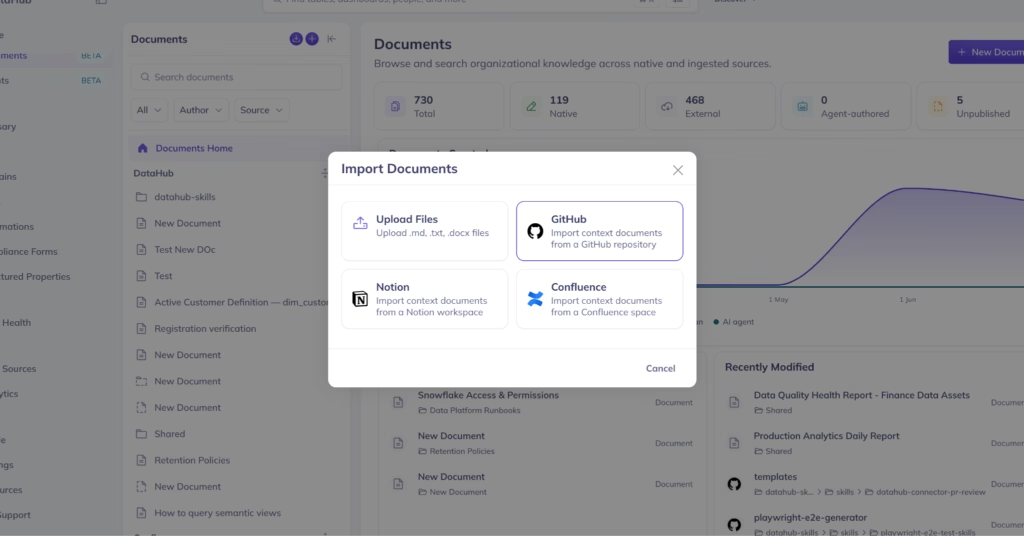
Learn more about Importing Context Documents in our docs.
Scoped MCP servers
A data engineer building pipelines and a finance analyst asking business questions need different tools and different context. Previously, every MCP client connected to a single default DataHub server and saw the same toolset, data assets, and context documents.
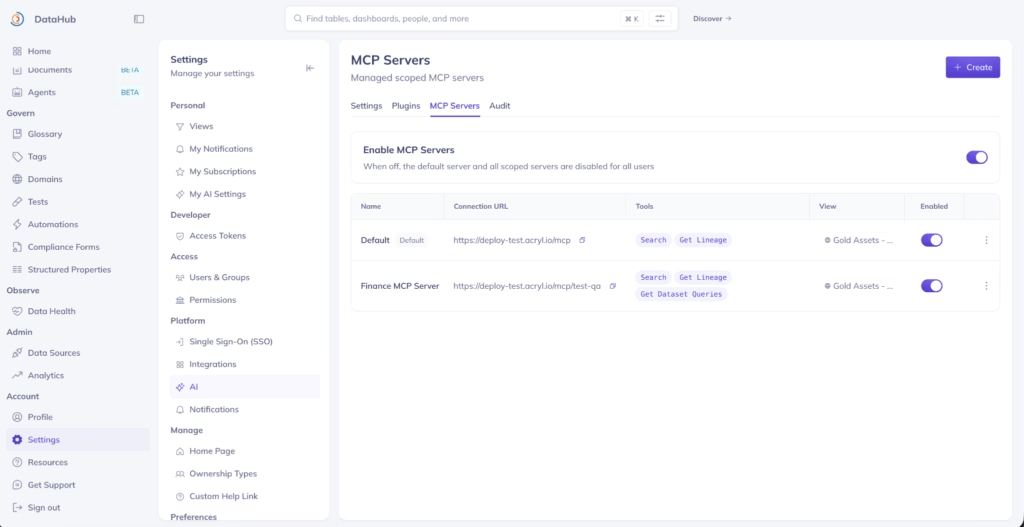
Scoped MCP servers let you create and publish purpose-built servers from the UI, each with a curated set of tools, its own instructions, and ability to view a specific set of data assets or context documents. Outside of DataHub, this enables you to build domain-specific agents with access to narrower sets of DataHub tools and context.
With Scoped MCP Servers, you can
- Build unique, domain-specific MCP servers with their own URLs: one for analytics agents, one for engineering workflows, one for executive-facing question answering
- Expose your own AI agents as callable tools on a scoped server, so MCP clients can invoke them alongside DataHub’s native tool set
- Attach server-level instructions to guide connected clients, configurable per server
To create a scoped MCP server, or edit the tools and data exposed in the default server, admins can navigate to Settings > AI > MCP Servers. Read more in the docs.
Scoped MCP Servers are currently enabled by default for all DataHub Cloud customers as part of the Context Platform Private Beta program.
Ask DataHub is generally available
After months of iteration, Ask DataHub is finally generally available to all DataHub Cloud customers! As part of the final wave of improvements, Ask DataHub asks users to confirm any operations that will make changes in DataHub.
As per the latest release, you can:
- Use Ask DataHub in production with confidence: every metadata edit requires a human to approve before it writes
- Audit agent tool usage: view agent reasoning traces and audit tool usage via the AI Tool Audit Dashboard
- Let agents propose changes at scale while human experts retain control over what changes are actually made
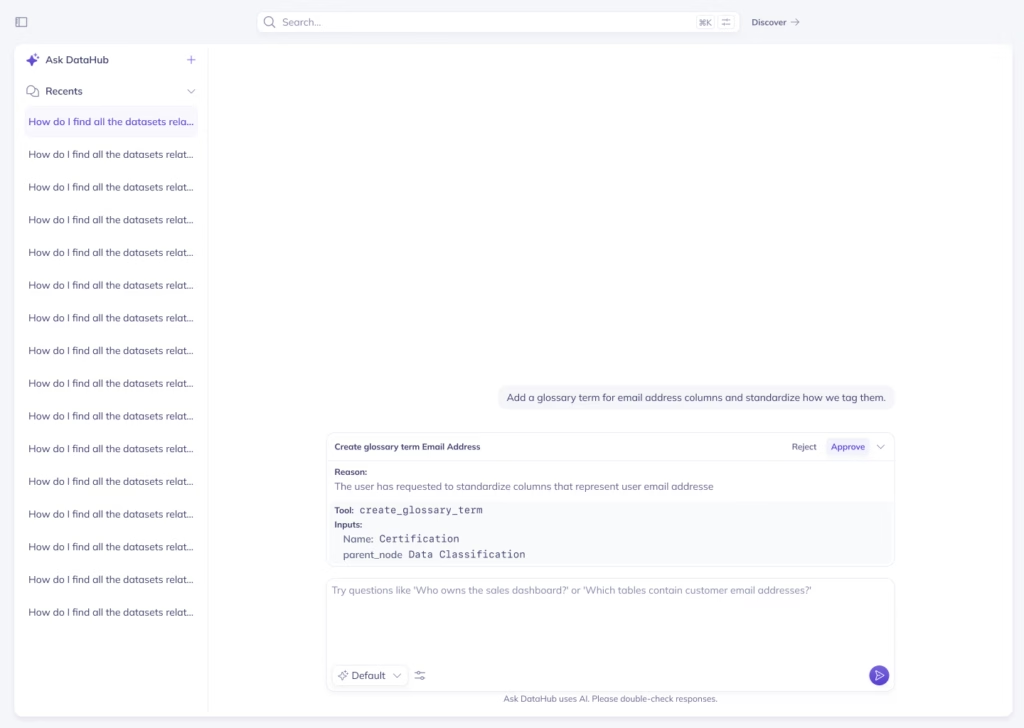
Learn more about Ask DataHub in our docs.
“We added Ask DataHub in our data support workflow and it has immediately lowered the friction to getting answers from our data. People ask more questions, learn more on their own, and jump in to help each other. It’s become a driver of adoption and collaboration”
Chime Data Platform Team
Metrics and semantic view SDK and UI
Business metrics have never had a home in the catalog. They lived in dbt YAML, BI tool settings, and Notion docs findable only if you already knew where to look. This release introduces Metric and Semantic SDK ingestion as first-class entities with dedicated pages, a metrics home, sidebar navigation, and autocomplete. Our metric and semantic model entities are derived from the Apache Ossie Spec, so definitions stay portable across the tools that adopt it. A business user can now search “net revenue,” find the metric entity, its definition, its semantic model, and the datasets it derives from.
You can now:
- Find any business metric in search alongside the datasets and pipelines it touches, without digging through dbt or BI tool configs
- Trace metric lineage back through the tables and transformations that feed it, so analysts know exactly what they’re measuring
- Catalog semantic models from dbt, Snowflake, Databricks, Cube, and other tools alongside the rest of your data estate
- Get metric suggestions in autocomplete as you type, so agents and analysts reach the right definition first time
Next up, we’ll be working on building native connectors to automatically ingest metrics and semantic models for platforms.
Logical model UI improvements
Creating and editing logical models previously required the API or SDK. v2.1 brings the full workflow into the UI. Open a new logical model from the search bar, define its columns, link it to physical datasets, and map columns side by side in the Physical Children sidebar. Domain experts and data stewards can manage the logical-to-physical mapping without engineering support.
You can now:
- Create logical models directly from the search bar without API access
- Link physical datasets to a logical parent and map their columns in the Physical Children sidebar
- Add, rename, retype, and delete columns on a logical model from the schema tab
- Control access with the new “Create Logical Models” platform privilege, granted to Admin by default
Multi-language support
DataHub just got a lot more global! Six new locales join the platform in this release, with multi-language support now on by default and browser locale detection automatic.
You can now:
- Use DataHub in your browser’s language without any configuration. Multi-language support defaults on and follows the browser locale; German (GA), Spanish, Brazilian Portuguese, French, Italian, Norwegian, Swedish, and Hungarian locales are available (Private Beta)
- Override your language anytime under Settings → Preferences
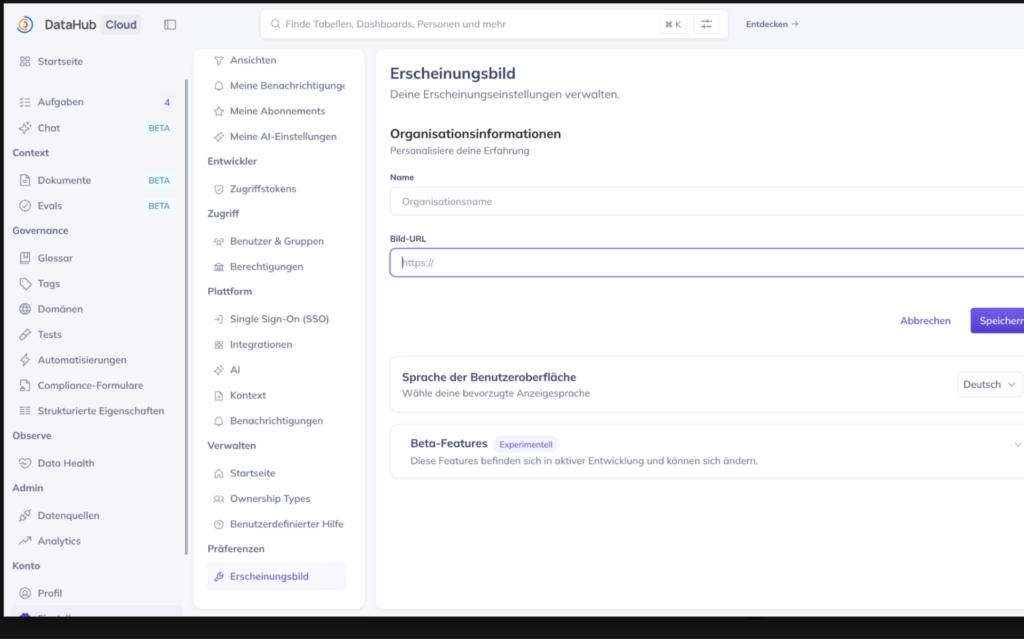
To add support for a new language, you can contribute changes to the Open Source repository. The recently merged PR for French language support is a good blueprint to follow. You can also search the codebase for “i18n” to find everything related to internationalization, and join the #design-i18n channel in DataHub Slack to ask questions or share progress.
Learn more in our multi-language support release blog and in our docs.
New ingestion connectors
v2.1 adds native connectors for four new data platforms, expanding DataHub’s metadata coverage across the modern data stack.
New sources:
| Connector | Category | What it brings |
|---|---|---|
| Cube | Semantic layer | Semantic model and metric definitions from Cube projects, connected to lineage |
| AWS Kinesis Data Streams, Amazon Data Firehose | Streaming infrastructure | Pipeline and stream metadata from Kinesis and Firehose |
| MicroStrategy | BI and analytics | Dashboard and report metadata with lineage to source tables |
| Open Data Contract Standard (ODCS) | Data contracts | Contract-defined schema and quality expectations registered as a distinct data platform |
Lineage improvements
We made the lineage graph easier to read and navigate. This release adds a redraw control, an empty-graph nudge, and modernized on-canvas controls.
“My favorite part about DataHub is the lineage because this is one really easy way of connecting the producers to the consumers. Now the producers know who is using their data. Consumers know where the data is coming from. And it is easier to have accountability mechanisms.”
Sherin ThomasSoftware Engineer, Chime
Let’s build together
We’re building DataHub Cloud in close partnership with our customers and community. Your feedback helps shape every release. Thank you for continuing to share it with us.