


How to Talk to Your Data (and Actually Get the Right Answer)
What does “talk to your data” actually mean?
“Talk to your data” refers to using natural language and large language models (LLMs) to query enterprise data through an AI agent, allowing non-technical users to get answers without writing SQL by hand. The term covers everything from off-the-shelf tools like Snowflake Cortex and Microsoft Copilot to custom agents built on LangChain or accessed through Model Context Protocol (MCP). What separates a good talk-to-your-data setup from a bad one is the context the agent has access to behind the chat interface.
An analyst pings the team’s data agent: “What was the weekly active user count for the new feature last week?” The agent returns a number. The number looks fine. The query ran, the SQL is valid, nothing erred out. Confidence is high.
The number is 3x too high.
Not because the model failed. The agent counted any user who triggered any event in a seven-day window, the standard industry default. The product team’s actual definition of weekly active users (WAU) is “completed at least one core action in seven days,” documented in a Notion page the agent never read. The agent had no way to know it existed.
This is the gap between “LLM connected to warehouse” and “talk to your data.” The first is easy. The second is what you actually wanted.
The six things every talk-to-your-data agent needs
Strip away the chat interface and what an agent does is: read a question, find relevant data, generate a query, return an answer. Each step depends on context the agent does not have by default. Schema alone won’t tell it which table is the source of truth, what “WAU” means in your org, whether the data is stale, or who’s allowed to see it.
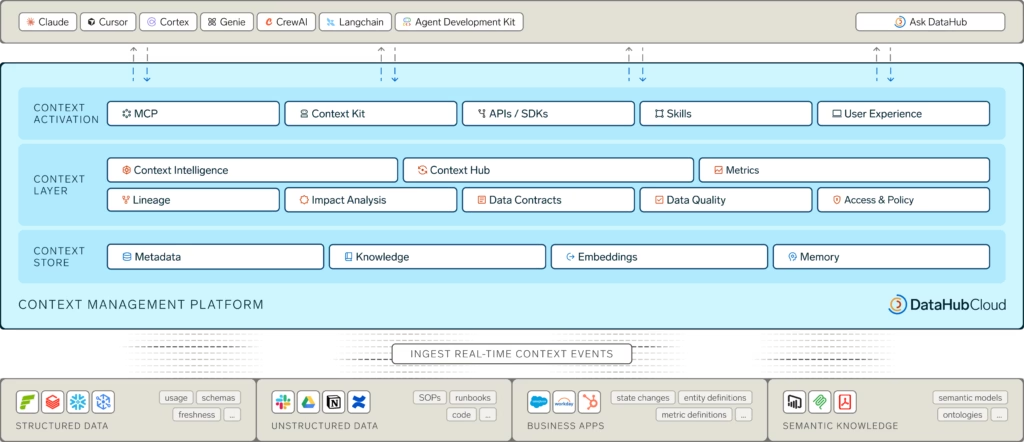
A context layer gives the agent the six things it needs.
1. Context documents
Quick definition: Context document
A first-class metadata asset that captures human-authored context (policies, decisions, runbooks, FAQs) and links it directly to the data assets it governs. Retrievable by an agent the same way a column description is. Learn more in What is a Context Catalog.
Context documents are everything that shapes the right answer but doesn’t fit a structured field. A deprecation notice that events_raw double-counted mobile sessions before September 2024. A runbook for what to check when WAU drops more than 20% week over week. A memo explaining why internal employees are excluded from product metrics. Without them, the agent answers with confidence and a missing footnote.
2. Business context: glossary, tags, data products, and structured properties
Your organization has a vocabulary: what counts as a “customer,” how “WAU” is defined, which accounts qualify as “enterprise” versus “mid-market.”
A business glossary captures terms like these as structured entries linked directly to the tables and columns that implement them. The product team’s strict WAU definition from the intro lives here. Tags and structured properties extend the glossary with classification labels and custom metadata fields: certified data products, PII flags, ownership, and anything else you want the agent to factor into its answer.
Without this, the agent guesses. Often it guesses correctly. The problem is you can’t tell when it didn’t.
3. Table and column definitions
Descriptions written for meaning, not just for column names. cust_seg_v3_final doesn’t tell the agent what the column contains. A description that explains it does.
Good documentation also notes what a column should not be used for: deprecated logic, edge cases, known issues.
This is where most teams under-invest, and where AI-generated documentation pulled from lineage and profiling statistics can do real work.
4. Lineage
Lineage does two things for an agent. First, it helps the agent select the right upstream source, not a derived table, not a deprecated one, not the analyst’s scratch table that happens to share a column name. Second, it makes the answer auditable. When someone asks “where did this number come from,” the agent (or the human reviewing the agent’s output) can trace the column back through every transformation to its origin.
Column-level lineage matters more than table-level here. Knowing the answer came from metrics_daily is useful. Knowing it came specifically from metrics_daily.weekly_active_users, calculated from events_raw.user_id and events_raw.event_name filtered to core actions, is what lets you trust the answer.
5. Data freshness and quality signals
If the agent is happy to return an answer based on a table that hasn’t refreshed in two weeks, it’s giving you the wrong answer with high confidence.
Quality and freshness signals (completeness checks, schema conformance, freshness SLAs) need to travel with the data the agent uses. The agent should be able to surface them (“this answer is based on data last updated 18 days ago”) or refuse to answer when the underlying data fails its assertions.
6. Access controls
The user asking the question has access to specific data. The agent answering on that user’s behalf needs to respect those permissions. This is non-negotiable in regulated industries, and it’s the difference between an agent you can deploy across the org and a demo you can only show to admins.
Role-based access has to flow through the context layer to the agent, so the answer a user gets is shaped by what that user is authorized to see.
Why this is an infrastructure problem, not a tool problem
Most teams approach talk-to-your-data as a tool decision: Cortex versus Copilot versus Ask DataHub versus build-your-own. That’s the wrong altitude.
The six requirements above don’t live in the agent. They live in the context layer the agent calls. Pick a different agent next quarter and you still need the same six things. Build a second agent for a different use case and you don’t want to rebuild context for it. You want both agents drawing from the same source of truth.
This is what a context platform does. It makes context available to any agent, on any surface, with the right access controls and the right retrieval mechanisms (semantic search for meaning-based lookup, MCP for tool-calling agents, SDKs for custom integrations).
The market is starting to recognize this.
According to DataHub’s State of Context Management Report 2026, 93% of organizations plan to treat context as shared infrastructure rather than team-specific tooling. The harder finding from the same report: 82% would somewhat or completely trust AI agents with high-stakes tasks even without reliable context, lineage, observability, and governance. That trust-readiness gap is exactly what produces the WAU scenario from the intro.
What “right context layer” looks like at scale: Pinterest
Pinterest built an enterprise analytics agent that draws from data sources across the company and used DataHub as its central context platform. The team’s engineering write-up is direct about what made it work: the semantic context foundation in DataHub laid the groundwork for everything that followed.
The outcome: the analytics agent now sees 10x the usage of any other internal tool at the company. Read the full case study for the architectural detail.
When agents have a trusted context layer underneath them, adoption follows. The bottleneck on enterprise AI isn’t model capability anymore. It’s whether the agent can answer accurately enough that people stop double-checking it.
The pattern shows up in third-party data too. According to IDC’s Business Value of DataHub Cloud report (March 2026), customers see a 51% increase in users leveraging natural language search via Ask DataHub and 119% more AI/ML models successfully reaching production.
Different metrics, same story: when the context layer does its job, agents get used and outputs get trusted.
How DataHub provides the context platform
DataHub’s job here is to be the layer underneath the agent, not another agent in the stack. Each of the six requirements above maps to a specific capability.
Definitions, lineage, quality, and access
The Business Glossary holds organizational vocabulary, with Tags and Structured Properties layering on classification and custom metadata.
Data Products package curated data assets that address a specific business use case, and aids in discoverability and usage.
Column-level lineage tracks how data moves through the stack, so an agent can pick the right source and explain its answer when asked.
Assertions monitor quality continuously, surfacing trust signals alongside the metadata an agent retrieves. Role-based access control flows through to the agent layer, so an agent’s response to any user respects what that user is authorized to see.
AI Documentation and Semantic Search
DataHub generates and maintains descriptions for tables and columns using lineage, existing documentation, sample values, and related metadata. Semantic Search chunks and embeds those descriptions so an agent searching for “product engagement” surfaces the right assets even when the column names don’t match the question.
Context Documents
DataHub treats policies, runbooks, decision logs, and FAQs as first-class graph nodes. Teams author them directly in DataHub or pull them in from existing systems through the Notion and Confluence connectors. Each document links to the specific data assets it governs, carries its own classification, and arrives at the agent with a full audit trail. The events_raw deprecation notice from earlier becomes something the agent can actually find, alongside every other piece of institutional knowledge that shapes a correct answer
The Agent Context Kit and DataHub MCP Server
DataHub offers two integration paths depending on what you’re building. For agents built on frameworks like LangChain, Google ADK, Vertex AI, Snowflake Cortex, or Copilot Studio, the Agent Context Kit provides SDKs and out-of-box integrations. For MCP-compatible tools like Claude, Cursor, and Windsurf, the DataHub MCP Server exposes the Context Graph directly. Agents can query the catalog, inspect lineage, and read governance, ownership, and quality signals. Mutation tools let them contribute back to the graph rather than just read from it.
For a deeper walkthrough with specific tools, see Supercharging Snowflake Agents with DataHub Context or the Ask DataHub post.
Getting talk-to-your-data right isn’t about picking a smarter LLM or a slicker chat UI. It’s about whether the context layer underneath the agent can answer six questions: what does this term mean here, what does this data actually contain, where did it come from, is it trustworthy, who’s allowed to see it, and what institutional knowledge governs how it should be used.
Build that layer once. Plug any agent into it. Trusted answers follow.
FAQs
Why do LLM-over-warehouse setups give wrong answers?
Why do LLM-over-warehouse setups give wrong answers?
Wrong answers come from a missing context layer, not a broken model. The schema tells an agent what data exists, not what it means in your business. Without a glossary, lineage, quality signals, access controls, and human-authored context documents, the agent falls back to industry defaults and statistical guesses. The result is structurally valid SQL that returns substantively wrong numbers presented as confident data insights, with no signal that anything went sideways.
What’s the difference between text-to-SQL and a context-aware data agent?
What’s the difference between text-to-SQL and a context-aware data agent?
Text-to-SQL converts a question asked in plain English into a SQL query against a known schema. A context-aware data agent does the same, plus it:
- Retrieves relevant business definitions
- Checks lineage to identify the right upstream source
- Factors in data quality and freshness signals
- Respects user-level access controls
- Surfaces relevant context documents to inform its data analysis
Text-to-SQL is one mechanism inside a context-aware agent, not a substitute for one.
Do I need a context platform to use Snowflake Cortex or Microsoft Copilot?
Do I need a context platform to use Snowflake Cortex or Microsoft Copilot?
You can run Cortex or Copilot without one. Whether you should depends on what you’re using it for. For sandboxed exploration on a single team’s data, built-in functionality is often enough. For agents that support decision-making across business data at organizational scale, where wrong answers carry cost, the context layer determines whether outputs can be trusted. A context platform like DataHub feeds Cortex, Copilot, or any other agent the definitions, lineage, and access controls those agents don’t have natively.
What metadata does an agent need to query my warehouse accurately?
What metadata does an agent need to query my warehouse accurately?
At minimum: business glossary terms that define organizational vocabulary, table and column descriptions written for meaning, column-level lineage for source-of-truth selection, data quality and freshness signals, access controls that flow through to user-level permissions, and human-authored context documents that capture institutional knowledge sitting outside the warehouse. Schema alone is not enough for any non-trivial query against complex data. Each layer addresses a specific failure mode in how agents find the right data and answer business questions accurately.
How do access controls work when an agent is querying data on a user’s behalf?
How do access controls work when an agent is querying data on a user’s behalf?
Access controls need to travel with the request, not the agent. When a user asks an agent a question, the agent should query and respond based on what that specific user is authorized to see, not what the agent itself has access to. This requires role-based access control to flow through the context layer to the agent’s retrieval and query layers. Without it, you’ve built a tool that leaks data the moment it’s used outside a controlled demo.
How do I get my data ready for talk-to-your-data agents?
How do I get my data ready for talk-to-your-data agents?
Getting agent-ready breaks down into four phases:
1. Foundations. Catalog your data assets, capture column-level lineage, and define organizational vocabulary in a business glossary so the agent has terms to anchor questions to.
2. Trust signals. Add quality assertions, freshness checks, and role-based access control so the agent knows what’s reliable and respects what each user is allowed to see.
3. Context documents. Bring in the institutional knowledge that doesn’t fit a structured field: runbooks, decision memos, deprecation notices, and policies. Link them to the data assets they govern.
4. Agent integration. Connect your agent through the Agent Context Kit (for frameworks like LangChain, Cortex, or Vertex AI) or the DataHub MCP Server (for MCP-compatible tools like Claude or Cursor).
What’s the difference between Ask DataHub and other talk-to-your-data tools?
What’s the difference between Ask DataHub and other talk-to-your-data tools?
Ask DataHub is a context-aware agent that runs natively on the DataHub Context Graph: the same graph that powers definitions, lineage, quality, and access controls for the rest of the platform. Other talk-to-your-data tools operate on top of a warehouse and may need a separate context layer to perform reliably. The practical difference is integration depth. Ask DataHub already has access to the metadata, glossary, lineage, and context documents an agent needs, without an additional integration step.