



Supercharging Snowflake Agents with DataHub Context
Your data team just set up Snowflake Cortex. Analysts are asking natural language questions, SQL is being generated on the fly, and everyone is impressed. But then someone asks a more nuanced question: “How much in high risk commercial real estate loans have we issued this year?” And the agent returns a number that’s completely wrong.
It didn’t fail because Cortex is broken. It failed because Cortex only knows what’s in the tables. It has no idea that your company defines “high risk” as an LTV ratio above 76% for commercial loans, not the blanket 80% it assumed. It also can’t check whether the data passed this morning’s quality checks. And finally, it has no visibility into where that data came from, how it’s typically queried by analysts, or what downstream reports depend on it.
This is the gap that DataHub’s Agent Context Kit is designed to address. Not by replacing Snowflake’s AI capabilities, but by giving them easy access to broad institutional knowledge they need to produce answers you can trust.
In this post, we’ll walk through how Snowflake’s agent ecosystem works, where the context gaps show up, and how DataHub bridges them with live metadata from your data catalog.
A primer on Snowflake’s AI stack
If you’re evaluating how to bring AI-powered analytics to your data team, it helps to understand the three building blocks Snowflake provides.
Cortex Agents
Snowflake Cortex is the AI layer that sits on top of your Snowflake warehouse. Among its capabilities, Cortex Agents enable natural language interaction with your data: a user asks a question in plain English, and the agent translates it into SQL, runs it, and returns a result. For teams that want to democratize data access without requiring everyone to write SQL, this is a significant step forward.
Semantic Views
Semantic Views are the mechanism you use to tell Cortex what it’s allowed to query and how to interpret it. Think of them as a curated lens over your warehouse: you define which tables and columns are exposed, add descriptions, and specify relationships. This is what gives Cortex enough context to generate reasonable SQL from a natural language question.
Snowflake Intelligence
Snowflake Intelligence is the interface layer that brings it all together, giving users a conversational UI where they can interact with Cortex Agents. It’s where your analysts and business users will actually go to ask questions, explore data, and get answers without needing to open a SQL worksheet.
Where semantic views end
Semantic views are bounded by design — and that’s a feature, not a bug. By scoping an agent to a curated set of tables, columns, and descriptions, you get highly accurate SQL generation for the questions that fall squarely within that scope. Snowflake does this well.
But enterprise data questions rarely stay neatly inside one view. An analyst asking “How much in high risk commercial real estate loans have we issued this year?” isn’t just asking for a filtered aggregate. They’re asking the agent to interpret business terminology (“high risk,” “commercial real estate”) according to internal policy, to know which table is the right one to query across a broader data estate, and to trust that the underlying data is fresh and reliable. That context, like business definitions, data quality signals, lineage, and related documentation, lives outside the semantic view.
This isn’t a limitation unique to Snowflake. It’s a structural reality of any system where the query interface is scoped to a specific set of tables. The semantic view knows about the columns it contains. It doesn’t know about the glossary terms your governance team maintains, the underwriting guidelines sitting in Confluence, the data quality checks running in your pipeline, or the upstream and downstream dependencies that determine whether a table is the right one to use in the first place.
How DataHub brings enterprise context to Snowflake Agents
DataHub’s Agent Context Kit is an integration layer that connects the metadata in your data catalog to the agents running inside Snowflake. When a Cortex agent receives a question, it can reach into DataHub at query time to pull in context that extends well beyond what the semantic view provides.
That context falls into three categories:
1. Business context
DataHub surfaces the enterprise knowledge that gives meaning to your data: glossary terms with precise business definitions, data products and domain ownership, and context documents pulled from knowledge bases like Notion and Confluence. When an agent encounters a term like “LTV Ratio” or “high risk,” it doesn’t guess. It retrieves your organization’s actual definition and applies it. This is the difference between an agent that generates plausible SQL and one that generates correct SQL.
2. Lineage and query patterns
DataHub provides visibility into the relationships in your data. Where it comes from, where it goes, and where it typically appears together. This includes the full upstream and downstream lineage that lives outside the semantic view’s scope: raw sources, staging transformations, downstream aggregates, and the dashboards or reports that depend on them. It also surfaces common join patterns, helping the agent understand not just what data exists but how it’s typically used together across the organization.
3. Data quality context
DataHub gives the agent real-time visibility into the health of the data it’s querying. This includes the current status of data quality checks — freshness, volume, schema, custom assertions — as well as monitoring patterns that identify anomalous behavior. Instead of silently returning results from a table that hasn’t been refreshed in 48 hours, the agent can proactively flag the issue before those numbers end up in a compliance report.
Seeing it in action
Let’s return to the financial services example and walk through how these capabilities change the experience in practice.
Generating SQL with enterprise context
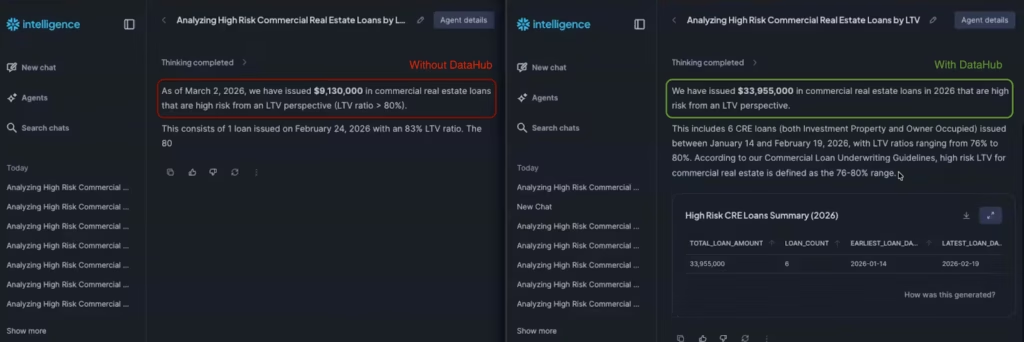
The question: “How much in commercial real estate loans have we issued this year that are high risk from an LTV perspective?”
Without DataHub, the agent generates SQL using a standard assumption — an 80% LTV threshold for “high risk.” It returns a small number of loans and a total around $9 million. The answer looks reasonable, and an analyst with no other reference point might accept it at face value.
With DataHub connected, the agent does something fundamentally different before writing any SQL. It retrieves the glossary term for “LTV Ratio” from the catalog, discovering that LTV is stored as a whole number (not a decimal). It then performs a semantic search across ingested documentation and surfaces the relevant section of the company’s commercial loan underwriting guidelines, which define the maximum acceptable LTV for commercial real estate at 76%. Applying that threshold instead, the agent returns six loans totaling $33 million — a materially different answer, and the correct one.The key insight here isn’t just that the number changed. It’s that the agent didn’t know what it didn’t know in the first scenario. It made an assumption, generated valid SQL, and returned a confident answer that happened to be wrong. DataHub gives the agent access to the same institutional knowledge a tenured analyst would have.
Validating data quality before trusting results
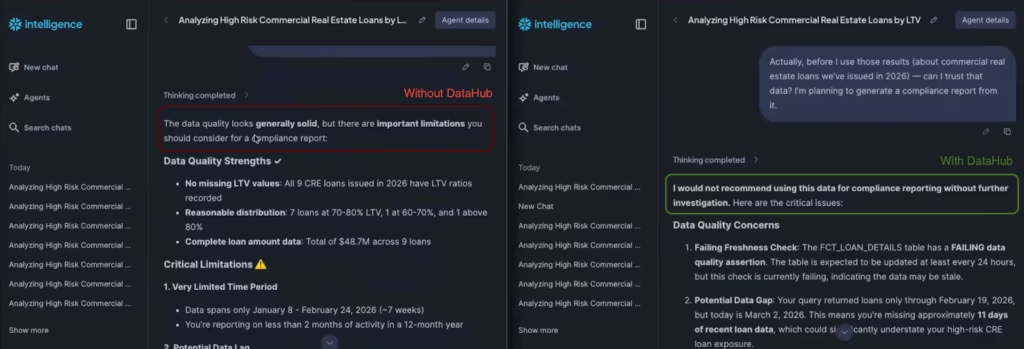
The follow-up question: “Can I trust that data? I’m planning to generate a compliance report from it.”
With DataHub connected, the agent can verify whether the data behind its answer is actually trustworthy. In this case, the agent checks the assertion status of the underlying table and reports that it’s currently failing a freshness check — meaning the data may be stale. For an analyst about to generate a compliance report, that’s exactly the kind of signal you want before the numbers leave the building.
Understanding lineage and impact
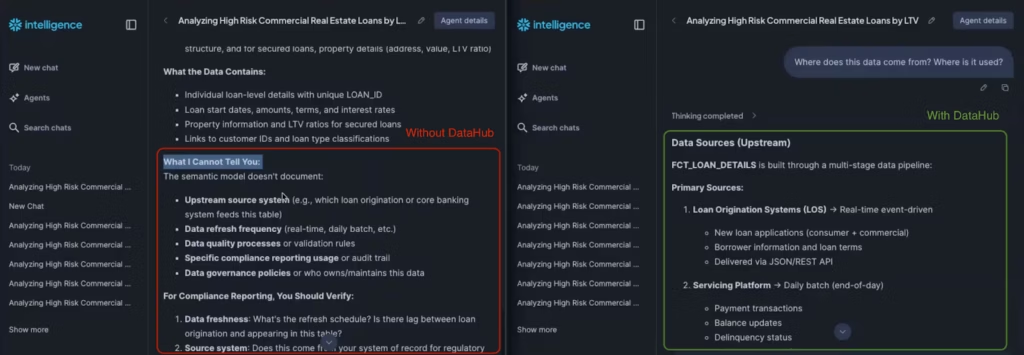
The question: “Where does this data come from? Where is it used?”
Without DataHub, the agent is limited to what’s inside the semantic view — which by design only includes the curated tables meant for end-user queries. It might guess at how a column is computed, but it can’t trace the full supply chain.
With DataHub, the agent surfaces the complete lineage: the data originates in a raw source table, passes through a staging layer where the LTV calculation is applied (loan amount divided by property value, multiplied by 100), and ultimately feeds into downstream aggregates used in executive dashboards. This gives engineers a clear picture of where to investigate if something looks off, and analysts confidence in what they’re looking at.
How the pieces fit together
If you’re setting up your Snowflake AI stack, the natural question is: what handles what?
Snowflake gives you the engine for conversational analytics — the text-to-SQL capabilities, the semantic layer that curates what’s queryable, and the Intelligence interface where your team actually interacts with it. That stack is powerful on its own for questions that can be answered purely from the data in your tables.
DataHub enters the picture when those answers need to be informed by the broader context that surrounds the data: what a term means according to internal policy, whether the underlying table is fresh enough to rely on, or where a number came from and what depends on it. That context already lives in your catalog — DataHub makes it accessible to the agent at query time.
In practice, different people on the team feel this in different ways. Analysts find that answers come back grounded in actual business definitions rather than assumptions. Engineers get lineage visibility that extends beyond the semantic view into the full data supply chain. Governance and risk teams see data quality signals surfaced proactively, before numbers make it into a report.
Getting started
The Agent Context Kit integration is designed to work with your existing Snowflake Intelligence setup. If you’re already using Cortex Agents and semantic views, adding DataHub context is a configuration step — not a rearchitecture.
You can find the full setup guide in the DataHub Agent Context Kit documentation for Snowflake, or request a demo to see it in action with your own data.
If you’ve invested in Snowflake for your analytics stack, DataHub helps you get the full return on that investment — ensuring that the AI layer built on top of your data is as smart about your business as it is about your tables.