


Building Autonomous Data Agents with DataHub Agent Context Kit
The age of autonomous data agents is [almost] here. Across analytics, governance, quality, and engineering, data teams are beginning to build and deploy AI agents that can autonomously navigate and act on enterprise data. What they’re finding is that the hard part isn’t standing up an agent, but rather it’s giving it enough context to make good decisions consistently. LLMs can generate SQL and orchestrate workflows, but without business context they’re flying blind. Which table should the agent use? What does “tier 1 customer” actually mean? Is Q3 calendar year or fiscal year? When agents lack access to institutional knowledge, wrong answers and eroded trust follow fast.
DataHub solves this by aggregating context and knowledge about your data — where it lives, who owns it, how it’s used, where it comes from, what business processes it is important for — into a Context Graph that gives agents a real-time picture of your entire data supply chain. The new DataHub Agent Context Kit builds on this graph, providing tools that make it easy for any agent to explore your data, understand its meaning, and make high-quality decisions. Whether you’re building a Data Analytics Agent, a Data Quality Agent, a Data Steward Agent, or a Data Engineering Agent, DataHub serves as the semantic backbone that grounds your agent with real enterprise context.
In this post, we’ll make it concrete by walking through a Data Analytics Agent end to end on two different platforms: Snowflake Cortex (a managed, out-of-the-box approach) and LangChain (a fully custom, code-first approach), and show how DataHub’s context layer can plug into whatever framework your organization is using to build and deploy agents.
What is DataHub Agent Context Kit?
The DataHub Agent Context Kit is a python package datahub-agent-context and a set of runbooks that help you build enterprise data agents on top of DataHub context. The package allows tools to be embedded directly in the agent and customized for your specific needs. The full toolset can be also included via DataHub’s MCP (Model Context Protocol) server.
We want to bring DataHub Context into your workflows and agents, no matter where your agent lives or what tools you are using. Some of the key tools that the agent provides include:
search: Find relevant datasets and terms.search_documents: Find business definitions and documentation.get_dataset_queries: Retrieve Sample SQL queries to help build query.list_schema_fields: Understand column semantics of a table.get_lineage: Understand data flow to find key tables.ask_datahub: Ask DataHub a natural language question. Available in DataHub Cloud v0.3.18+!
Building agents with Agent Context Kit
DataHub can equip AI agents to navigate your enterprise data ecosystem and institutional knowledge with ease. Here are four example types of agents that you can build with DataHub:
- Data Analytics Agent: An agent that can answer natural language business questions using Text To SQL. This agent would find and understand trustworthy data to use. DataHub, using the semantic metadata captured inside (descriptions, glossary terms, sample queries, stats, and more) would determine the correct tables and SQL to use. Execute the SQL against your data warehouse (Snowflake, BigQuery, Databricks) to provide a result. Return a human-readable result based on the SQL data to the user.
- Data Quality Agent: An agent to help maintain and improve data quality by autonomously scanning for problems in the data and intelligently providing solutions. This agent would find important tables (by usage), add data quality assertions (in DataHub and beyond). Generate data health reports daily, by domain or owning team, by leveraging the data quality assertion and incident health in DataHub.
- Data Steward Agent: An agent to autonomously monitor, enforce, and maintain data policies. This agent would find target tables (by platform, domain, or ownership), cross-reference schema metadata against critical glossary terms, and apply glossary terms and descriptions. Generate reports on where sensitive data exists, or use of PII exists across the organization.
- Data Engineering Agent: An agent to help create data pipelines and build tooling for interacting with your data. This agent would find source or target tables based on the data engineering needs and look up the lineage and schema to understand how this data is generated. The agent can suggest or generate code to help build a data pipeline to perform a data transformation.
This post will do a deep dive on the Data Analytics Agent use case with Snowflake Cortex Code and LangChain as our first examples. In addition to these frameworks, Agent Context Kit works with Google ADK, Snowflake Intelligence, Databricks Genie, Claude Code, and many others. Additionally, any AI agent that can connect to the DataHub MCP server can leverage DataHub’s context capabilities.
Example: Building an autonomous Data Analytics Agent
Imagine the following scenario: A business analyst asks an analyst agent to track net revenue retention by customer segment in Q4, excluding one-time discounts and credits. How would an AI agent solve this? Here’s a hint: Probably the same way your data analysts would!
First, the agent would first need to know what “net retention revenue”, “one-time discount and credit”, and “customer segment” means. To find this, it would need access to some form of definitions to help define each of these terms. Then, it would need to find existing tables, columns, dashboards, etc. that contain the data required to answer the question, including the correct filtering and grouping dimensions required to perform the analysis at a customer segment level. Finally, it would need to generate SQL and push it down to wherever the data resides, most often your data warehouse.
Where DataHub comes in is in the first two steps of the process, providing the context required for agents to solve the problem without human intervention. It surfaces both technical details and broader enterprise knowledge, including business definitions, metrics, documents, data assets and their structure, past queries, lineage, and more so that the agent can both understand the business phrases AND find the right data to use to answer the question. Once the agent has found the right business definitions and data, it can generate SQL and send the query over to the data warehouse where it is executed to produce a concrete result.
In general, the AI workflow that is required to answer any business analytics question looks something like the following:
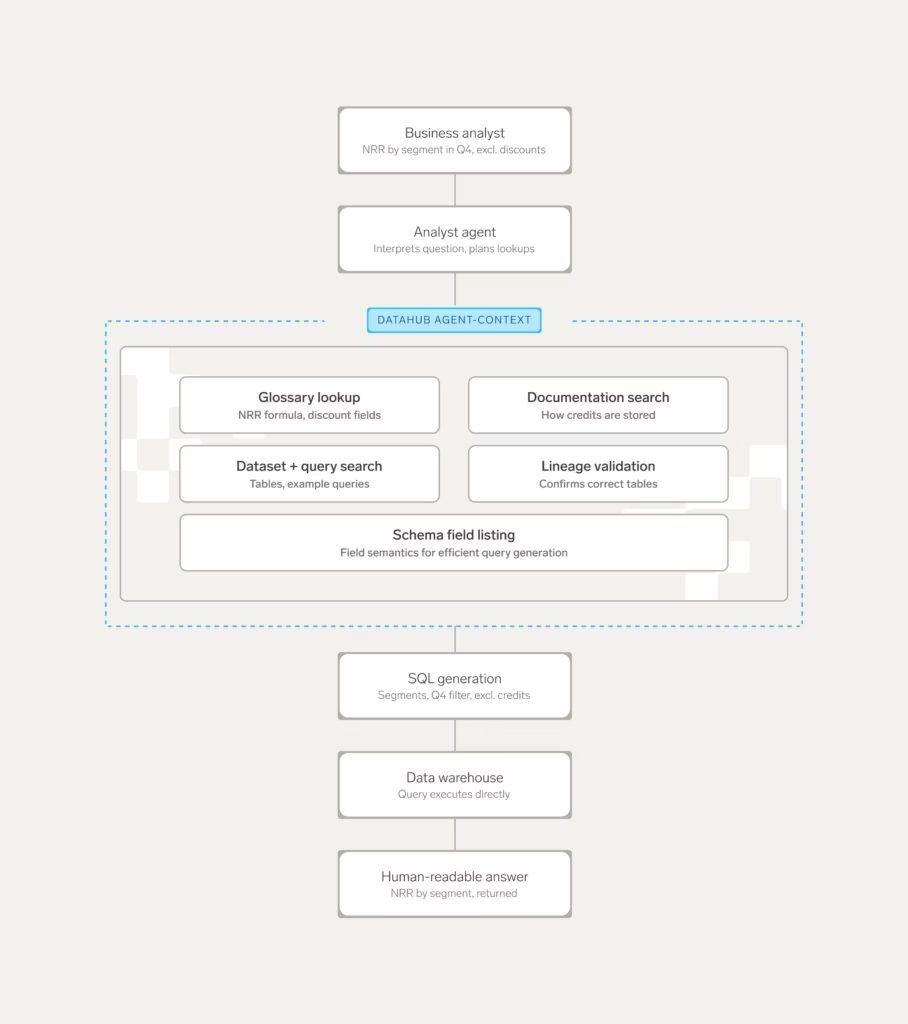
In the next sections, we’ll cover how to implement an agent that can consistently and reliably perform this type of workflow on top of two popular tools: Snowflake and LangChain.
Building an agent with Snowflake
Snowflake has two primary ways of building agents on the Snowflake platform: Snowflake Cortex Agents and Snowflake Cortex Code. Snowflake Cortex Agents are deployed on Snowflake Intelligence to support interactive agents. Snowflake Cortex Code is a CLI assistant similar to Claude Code for building data workflows. These powerful tools provide Snowflake Native ways of building agents and interacting with your Snowflake data. The Snowflake tools are primarily no/low code solutions to help a team more deeply integrate into the Snowflake ecosystem.
Consider an analyst asking the question: “What was our customer churn rate by segment last quarter?” Cortex Code can use the DataHub Agent Context Kit to find documentation, and the glossary definition of churn. Next, it can look up what the certified dataset for customers is and the schema. Finally, the agent can generate the correct query and use Snowflake execute SQL tools to compute the result and provide a conversational answer back to the analyst.
Let’s look at how to build an agent with Cortex Code.
Getting started with Cortex Code
Snowflake Cortex Code is a great no-code tool for building agents with access to both semantic context from DataHub AND raw SQL execution. Snowflake has great text to SQL, the DataHub integration provides the necessary business context to augment the generation to get a much stronger experience. DataHub gives you the ability to search over your data catalog from within Snowflake. Snowflake Cortex Code in Snowsight, Snowflake’s UI, doesn’t yet support MCP, but should in the future allow plugging in DataHub directly into the Snowflake UI.
The Cortex Code CLI supports MCP out of the box and can be added with the following command to add the DataHub MCP server:
cortex mcp add DataHub https://<tenant>.acryl.io/integrations/ai/mcp --transport=http --header "Authorization: Bearer <token>Cortex CLI, once launched, will connect to DataHub and be able to fetch context from DataHub’s MCP server and use that information to generate and execute queries.
Getting started with Cortex Agents
DataHub can also integrate with Snowflake Cortex Agents via a set of UDFs. The DataHub-agent-context[snowflake] add-on package contains scripts to deploy the Snowflake DataHub connectors into your account and create a Snowflake Intelligence agent. It is recommended to use Cortex Code as the preferred integration as it is much simpler and more robust.
The following query shows how to set up a Snowflake agent with DataHub.
datahub agent create snowflake \
  --sf-account YOUR_ACCOUNT \
  --sf-user YOUR_USER \
  --sf-password YOUR_PASSWORD \
  --sf-role YOUR_ROLE \
  --sf-warehouse YOUR_WAREHOUSE \
  --sf-database YOUR_DATABASE \
  --sf-schema YOUR_SCHEMA \
  --datahub-url https://your-datahub.acryl.io \
  --datahub-token YOUR_TOKEN \
  --enable-mutations \
  --enable-cloud \ # Enable Cloud Tools! (Ask DataHub, etc)
  --execute
Building an agent with LangChain
If you want a fully custom experience where you control the entire agent behavior (for example, to integrate with any additional tooling and data warehouses), then a flexible and configurable framework such as LangChain may be an ideal choice. Flexible tools like LangChain allow fully configured agents as code that can connect to arbitrary toolsets, multiple data warehouses, and run in your environment locally, embedded in another application such as Slack or Teams or hosted with a UI.
The DataHub Agent Context Kit has two ways to integrate with a framework such as LangChain:
1. Using the SDK to bundle tools directly into the agent
2. Connecting to DataHub’s MCP server from a LangChain agent
The first path is recommended when wanting to make customizations to the tools included or have a more consistent experience by locking the tool versions. The second path is recommended if you want to take advantage of the latest MCP tools and server side improvements immediately. Both paths provide a fully featured DataHub experience and make the entire context available.
As an example, LangChain can enable you to build a custom Slackbot agent deployed in your enterprise to allow any data user to ask questions about the business. Imagine the user asking the following question: “What are our top 10 customers by lifetime value?” The agent can search for “lifetime value” in documentation or glossary terms to find the business definition. The agent then searches for datasets that contain ltv and finds a table in BigQuery. The agent inspects the table schema to understand column semantics. The agent is then able to get dataset queries to find examples of queries against this table for use when generating SQL. Finally, the agent generates SQL and executes the query using the BigQuery LangChain integration via MCP to give an answer back to the user. These are the kinds of data analytics questions that DataHub can help you answer with Agent Context Kit and LangChain.
Getting started with LangChain agents
Install the pip package pip install datahub-agent-context[langchain] to get started and configure a DataHubClient. Then, simply import DataHub tools using the “build_langchainhain_tools” method to bring in DataHub Open Source tools, and “build_langchain_cloud_tools” to bring in DataHub Cloud tools:
from DataHub.sdk.main_client import DataHubClient
from DataHub_agent_context.langchainhain_tools import build_langchainhain_tools
from LangChain_openai import ChatOpenAI
from LangChain.agents import AgentExecutor, create_tool_calling_agent
from LangChain.prompts import ChatPromptTemplate

# Initialize DataHub client
client = DataHubClient.from_env()
# Or: client = DataHubClient(server="http://localhost:8080", token="YOUR_TOKEN")

# Build DataHub OSS tools (read-only)
tools = build_langchainhain_tools(client, include_mutations=False)

# Build DataHub Cloud tools
# cloud_tools = build_langchain_cloud_tools(client)

# Initialize LLM
llm = ChatOpenAI(
    model="gpt-5.3",
    temperature=0,
    openai_api_key="YOUR_OPENAI_KEY"
)

# Create agent prompt
prompt = ChatPromptTemplate.from_messages([
    ("system", """You are a helpful data catalog assistant with access to DataHub metadata.

    Use the available tools to:
    - Search for datasets, dashboards, and other data assets
    - Get detailed entity information including schemas and descriptions
    - Trace data lineage to understand data flow
    - Find documentation and business glossary terms

    Always provide URNs when referencing entities so users can find them in DataHub.
    Be concise but thorough in your explanations."""),
    ("human", "{input}"),
    ("placeholder", "{agent_scratchpad}"),
])

# Create agent
agent = create_tool_calling_agent(llm, tools, prompt)
agent_executor = AgentExecutor(
    agent=agent,
    tools=tools,
    verbose=True,
    handle_parsing_errors=True
)

# Use the agent
def ask_DataHub(question: str):
    """Ask a question about your data catalog."""
    result = agent_executor.invoke({"input": question})
    return result["output"]

# Example queries
if __name__ == "__main__":
    # Find datasets
    print(ask_DataHub("Find all datasets about customers"))

    # Get schema information
    print(ask_DataHub("What columns are in the user_events dataset?"))

    # Trace lineage
    print(ask_DataHub("Show me the upstream sources for the revenue dashboard"))

    # Find documentation
    print(ask_DataHub("What's the business definition of 'churn rate'?"))
Approaches for building agents
We covered two possible tools out of many options that exist in the market today. Examples of no/low code solutions include Snowflake Cortex Code, Databricks Genie, Google VertexAI builder, using MCP servers directly in Claude, ChatGPT, or Gemini and others. Examples of higher touch agent frameworks include LangChain, Google ADK, CrewAI, and others.
The table below compares the two types of solutions we discussed above based on their tradeoffs and complexity. The exact capabilities depend on the individual frameworks used.
| Zero or low code | High code | |
| Flexibility | Limited, cannot customize all tooling | Fully customizable, can configure tools to include, customize prompt |
| Warehouse | Platform specific | Warehouse agnostic |
| Deployment | CLI today or UI, platform specific | Custom CLI or UI deployed |
| LLM | Provider-limited LLM | Any LLM |
If you have a single warehouse in Snowflake and work primarily in Snowflake, starting with the zero to low code option is a great starting place to enhance your analyst capabilities. If you have a multi-warehouse setup, or want to embed custom tooling and want to build your own CLI/UI the fully custom LangChain or similar framework approach is the recommended path.
Building agents on other frameworks
DataHub Agent Context Kit is designed to be a universal solution that can integrate with all agent tools and platforms. The full list of integrations currently available can be found on the Agent Context Kit docs website.
Below is the table of currently supported platforms. In addition to the list below, DataHub’s MCP server or Python libraries can be used with any compatible tool or framework.
| Platform | Status | Guide |
| Cursor | Launched | Cursor Guide |
| Claude | Launched | Claude Guide |
| Gemini CLI | Launched | Gemini CLI Guide |
| Langchain | Launched | LangChain Guide |
| Snowflake Cortex Agents | Launched | Snowflake Cortex Agents Guide |
| Snowflake Cortex Code | Launched | Snowflake Cortex Code Guide |
| Databricks Genie | Launched | Databricks Genie Guide |
| Google ADK | Launched | Google ADK Guide |
| Google Vertex AI | Launched | Google Vertex AI Guide |
| Microsoft Copilot Studio | Launched | Copilot Studio Guide |
| Crew AI | Coming Soon | – |
| OpenAI | Coming Soon | – |
What’s next
Next time we will discuss some other agents you can build with DataHub Agent Context Kit:
- Data Quality Agent: An agent to help maintain and improve data quality by autonomously scanning for problems in the data and intelligently providing solutions.
- Data Steward Agent: An agent to autonomously monitor, enforce, and maintain data policies.
- Data Engineering Agent: An agent to help create data pipelines and build tooling for interacting with your data.
Get started with the agent-context-kit today to start seeing how DataHub can help you build autonomous agents on top of your enterprise data ecosystem. And don’t forget to join the DataHub Community on Slack to join the conversation around building autonomous data agents!