



Agents, Apps & the Art of Extension: March 2026 Town Hall Highlights
Most teams don’t struggle with collecting metadata anymore. They struggle with making it usable—for humans navigating data and for AI systems trying to reason about it.
At the March DataHub Town Hall, we focused on what happens after ingestion: how teams use context, extend DataHub safely, and apply it in real workflows.
The session featured:
- A real-world implementation from ICA Gruppen, showing how Ask DataHub and Context Documents are used in production
- A micro frontend framework for building custom apps inside DataHub without forking
- Release highlights across DataHub Core 1.5.0 and Cloud 0.3.17
- An introduction to our Agent Context Kit and how it enables context-aware workflows
This recap walks through the key demos, architectural decisions, and product improvements from the session.
Community momentum: Meetups, hackathons, and what’s next
DataHub adoption continues to show up in how teams share and apply it in practice—not just in usage, but in how they extend and operationalize it.
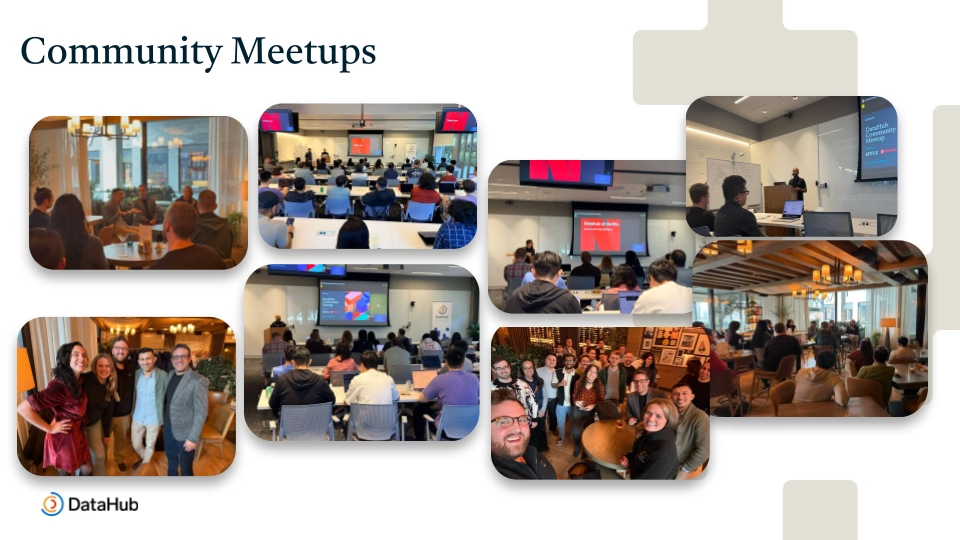
In March, meetups in Chicago and at Netflix’s campus in Los Gatos brought together data engineers and platform teams to discuss how they are building and scaling data systems, including AI-driven workflows.
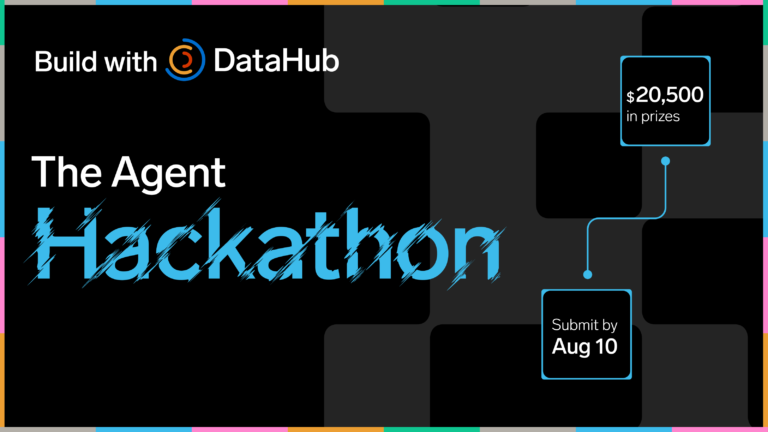
Upcoming hackathons and hands-on events will focus on building directly on DataHub. These include developing data agents, extending metadata workflows, and testing new use cases on top of the platform.
We also introduced the DataHub Community Champion Program to recognize contributors who actively support the ecosystem. This includes practitioners answering questions in Slack, contributing integrations, and sharing real-world implementations.
Champions work closely with the DataHub team and help shape the product through direct feedback and contributions.
To stay updated on upcoming events and community initiatives, join the DataHub Slack community and connect with practitioners building modern data platforms.
Turning metadata into usable context with AI
Adding AI to a data platform is straightforward. Making it useful—and trustworthy—is harder.
In this session, Björn Barrefors, Metadata Management Lead at ICA Gruppen, a Swedish retailer operating across groceries, banking, insurance, and more, demonstrated how his team applies this in practice.
After adopting DataHub, usability remained a key challenge—especially for new users navigating the catalog.
Even with a modern interface, users still struggled with:
- Understanding concepts like lineage and domains
- Debugging dashboards across unfamiliar datasets
- Accessing documentation and policies spread across systems
How Ask DataHub changes the interaction model
Instead of navigating the catalog manually, users interact with metadata through natural language.
Ask DataHub translates user questions into:
- Metadata retrieval
- Context from connected systems
- Structured, explainable responses
For example:
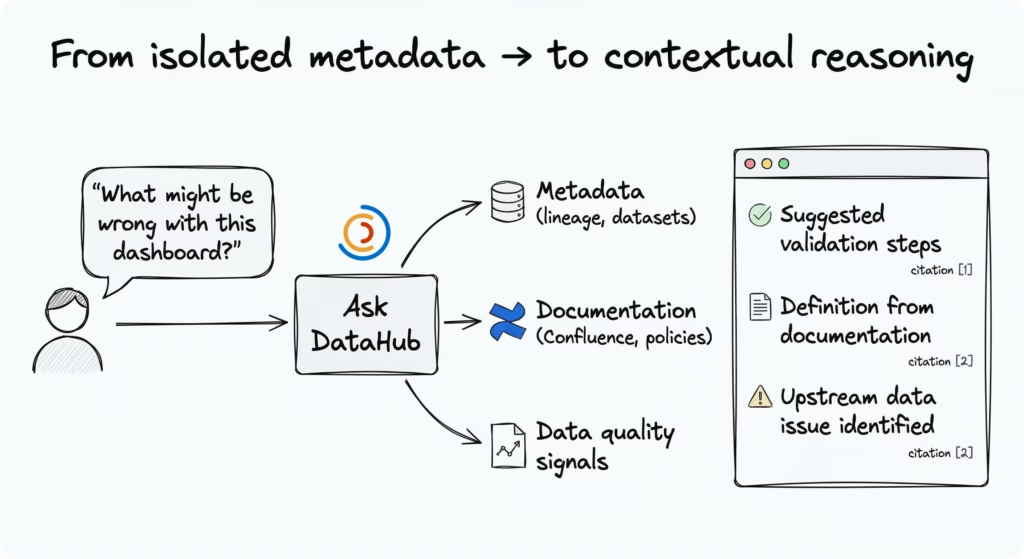
> “What might be wrong with this dashboard?”
Initially, Ask DataHub suggested standard validation steps for the dashboard. In ICA’s workflow, debugging typically relies on individual experience and repeated manual checks. This breaks down when ownership is unclear or when upstream issues are not visible.
As Björn showed, this interaction changes with Ask DataHub. After ingesting a Confluence space, the system was able to incorporate organizational context into its responses.
> “Is this value calculated according to company standards?”
In response, Ask DataHub:
- Suggested validation steps for the dashboard
- Pulled definitions directly from internal documentation (even when they were not part of the existing glossary)
- Identified known upstream data quality issues
This happened with essentially no setup. Simply ingesting Confluence data immediately improved the quality of responses.
Extending context with documents and policies
Björn also demonstrated how ICA applies this approach to data governance and classification decisions.
Instead of building a fully automated system, they:
- Ingest internal policy documents into DataHub
- Direct AI to reference those documents
- Require responses to include reasoning
This approach keeps humans in control: AI supports decisions without becoming a black box, and outputs remain verifiable against documented policies.
“This isn’t a super complex or fully automatic agent—and that’s fine. What we have done is a safe way to use AI without ruining trust for the catalog.”
— Björn Barrefors, Metadata Management Lead, ICA Gruppen
This design is intentionally simple—focused on augmenting human decisions rather than automating them.
The real impact comes from combining metadata with real-world context, making it easier to reason about data in the flow of work.
Extending DataHub without forking: Introducing micro frontends
Most teams don’t struggle with adopting a data platform. They struggle with adapting it to their workflows.
They need to support internal dashboards, domain-specific workflows, and integrations with private systems. But modifying the core platform usually means maintaining a fork—something that quickly becomes expensive and hard to sustain.
What is the micro frontend framework?
DataHub’s micro frontend (MFE) framework lets you build and run custom applications inside DataHub without modifying the core platform.
Each app:
- Runs independently
- Loads dynamically at runtime
- Shares authentication with DataHub
- Calls DataHub APIs
These apps are rendered alongside the native DataHub UI, so users can move between core features and custom extensions within a single interface.
This decoupled setup allows teams to develop and deploy apps independently, without modifying or redeploying DataHub itself.
Why teams needed a third way to extend DataHub
Before this, teams had two options:
- Contribute upstream (if the feature was broadly useful)
- Maintain a fork (if the use case was organization-specific)
Both approaches come with trade-offs. Contributions require generalization and review cycles, while forks introduce long-term maintenance overhead.
Micro frontends add a third option: extend DataHub without maintaining a fork.
This directly addresses a common need raised by teams: bringing organization-specific views, workflows, and integrations into the DataHub interface without diverging from the core product.
What teams can build
The framework supports a wide range of use cases:
- Custom dashboards that combine DataHub metadata with internal data sources
- Organization-specific workflows that are not generalizable to the broader community
- UI extensions tailored to internal processes and tooling
Because these apps run within DataHub and share authentication, they can interact with both DataHub APIs and internal services.
How micro frontends work in DataHub
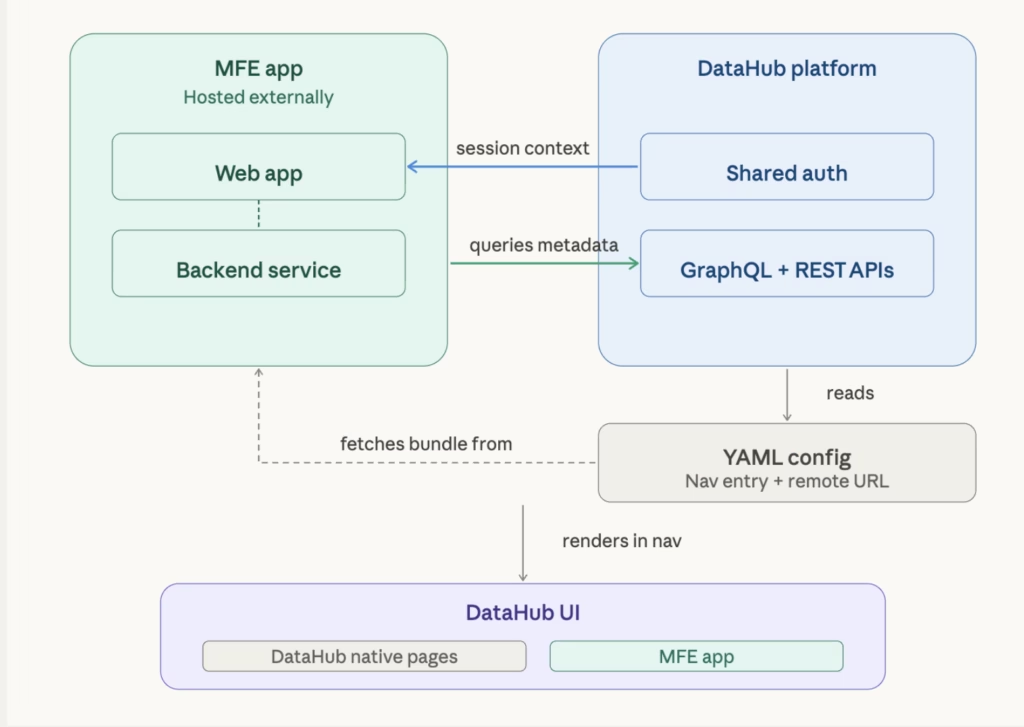
Micro frontends are loaded into DataHub at runtime using configuration.
- Each app is hosted separately and exposed via a remote URL
- DataHub reads a YAML configuration file to discover available apps
- The platform fetches and loads these apps dynamically into the UI
These apps run within the same application context:
- They share authentication
- They can call DataHub APIs
- They can integrate with internal backend services
This model separates extension development from the core platform lifecycle, allowing teams to iterate independently without introducing maintenance overhead.
Demo: Building and deploying an MFE app
The live demo walked through the full lifecycle of creating and integrating a micro frontend:
- Generate a React-based micro frontend app using DataHub skills (via an AI agent)
- Configure and register the app using YAML
- Load the app into DataHub
The demo also showed how these apps appear in the DataHub interface, accessible through the navigation bar alongside native features.
What’s new in DataHub Core 1.5.0 and Cloud 0.3.17
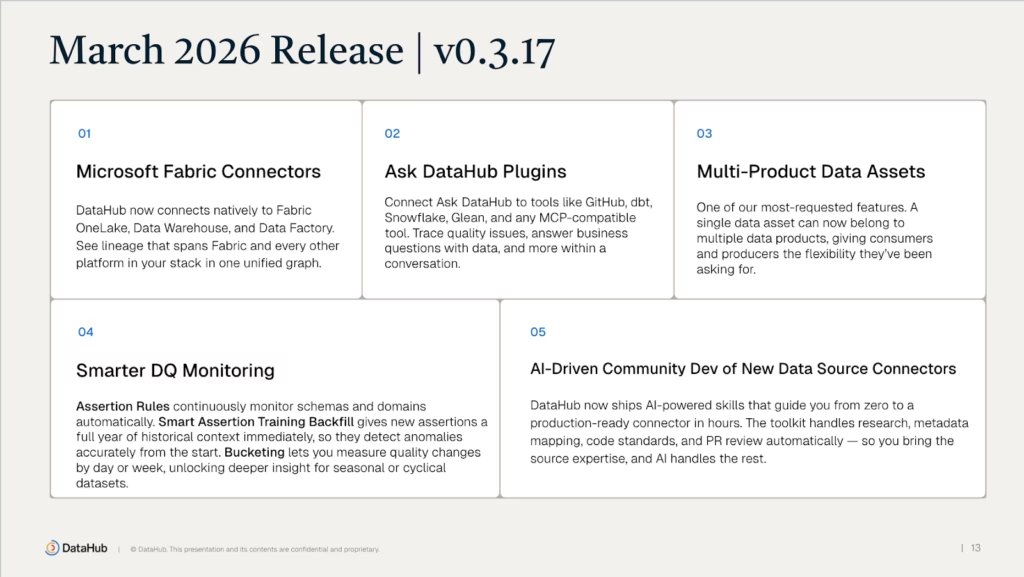
The March release introduced updates across lineage, integrations, and observability.
1. Microsoft Fabric connectors
New connectors support ingestion from:
- Fabric OneLake
- Fabric Data Factory
- Fabric Data Warehouse
These connectors enable end-to-end lineage across Microsoft ecosystems, especially in Azure-based environments.
2. Ask DataHub plugins extend beyond the catalog
Ask DataHub now integrates with external systems, including:
- GitHub
- dbt
- Snowflake
- Glean
- Model Context Protocol (MCP)-compatible tools
With these integrations, users can:
- Retrieve context across systems
- Trigger actions directly from workflows
- Work across tools without switching environments
3. Multi-product data assets
Previously, a data asset could belong to only one data product.
Now, a single asset can be linked to multiple products. This reflects how datasets are reused across teams and use cases.
4. Improved asset summary experience
A new summary view surfaces:
- Business context
- Key metadata
- Important signals
This reduces navigation overhead and makes it easier to understand assets at a glance.
5. Smarter observability in DataHub Cloud
Updates to DataHub Observe include:
- Monitoring rules for schemas and metadata
- Automatic historical backfill for anomaly detection
- Better handling of weekly, monthly, and seasonal patterns
These improvements reduce false positives and improve signal quality.
6. AI-assisted connector development
Building on DataHub Skills, recent updates simplify how teams build and integrate new data source connectors.
These skills enable teams to:
- Accelerate connector development
- Reduce integration complexity
- Use guided workflows for building and testing connectors
Teams are already using these workflows to build connectors for emerging tools
Building AI agents with DataHub context
While earlier sections focused on how teams use DataHub and extend it, this segment explored how to bring DataHub context directly into AI agent workflows.
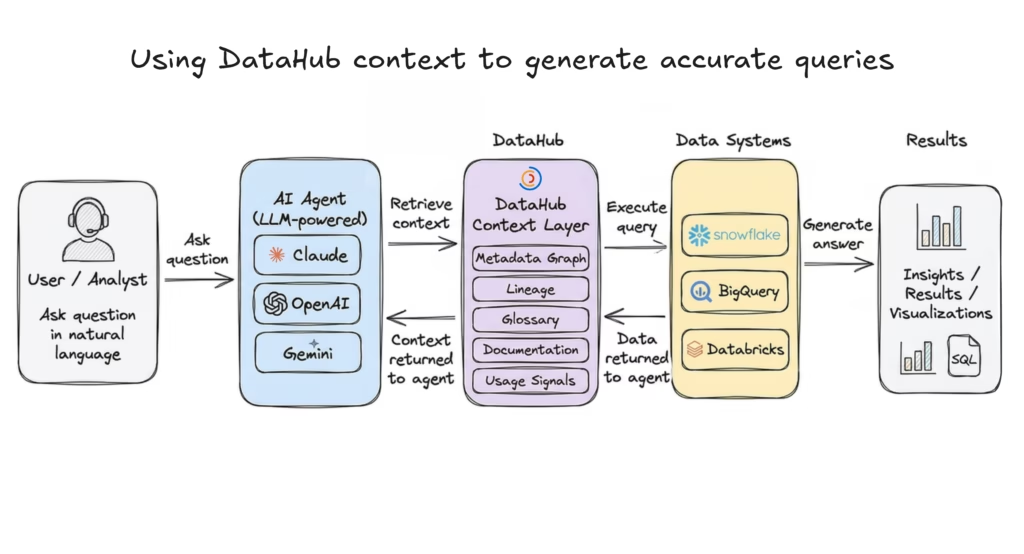
John Joyce, Co-founder of DataHub, walked through the Agent Context Kit: a set of tools, SDKs, and workflows designed to help teams build context-aware agents,regardless of where those agents are deployed—whether that’s Claude, OpenAI-based systems, Google Gemini, or custom internal platforms. The goal is to let teams build agents in the tools their users already use, so those agents can reason about data using the same context the team relies on.
Types of agents you can build
DataHub enables multiple categories of agents:
| Agent | Description |
| Data analytics agents (Text-to-SQL) | Translate natural language into queries Use DataHub to find and understand trusted data Execute queries on warehouses like Snowflake, BigQuery, Databricks |
| Data quality agents | Identify important datasets based on usageAutomatically generate data quality checksProduce health reports across domains and teams |
| Governance agents | Apply glossary terms and compliance policiesIdentify sensitive data (PII, regulated data)Generate governance and compliance reports |
What context DataHub provides to agents
DataHub provides multiple layers of context that help agents move beyond raw data access:
- Business context → glossary terms, domains, documentation from tools like Notion and Confluence
- Lineage and query patterns → understanding how data flows and is used across systems
- Data quality context → visibility into freshness, volume, and quality signals
- Shared memory → storing insights, queries, and context for reuse across workflows
Example: Building a data analytics agent with Google Gemini
One of the key walkthroughs demonstrated how to build a data analytics agent using DataHub context and the Google Gemini ecosystem.
These agents take natural language questions (e.g., from business users) and return answers by generating and executing SQL.
If you’re building with Gemini, you’ll typically interact with:
- Gemini CLI → for interactive, terminal-based workflows
- Google Vertex AI → for deploying and managing production agents
- Google ADK (Agent Development Kit) → for building and orchestrating agents in Python
How the agent works
In the demo, the agent uses DataHub’s Model Context Protocol (MCP) Server to retrieve metadata and business context (via tools like build_google_adk_tools) before generating queries, and executes those queries against a data warehouse like BigQuery.
At a high level, the agent follows a simple two-stage workflow:
- Find and understand the right data
- Identify relevant datasets
- Use DataHub to understand definitions, lineage, and ownership
- Ground the query in business context, not just schemas
- Query and return results
- Generate SQL based on the retrieved context
- Execute against a data warehouse (e.g., BigQuery)
- Return structured or natural language responses
Follow the full implementation guide in the Google ADK + DataHub guide.
“DataHub provides the context that’s required to not only find the right data to use, but to generate more accurate queries.”
John JoyceCo-founder, DataHub
This is the key shift: From generating queries → to reasoning with context.
DataHub as the semantic backbone for agents
Across these workflows, DataHub acts as the semantic backbone for AI agents.
It provides:
- Technical metadata (schemas, lineage)
- Business context (domains, glossary, documentation)
- Operational signals (usage, data quality)
- Shared memory (stored insights and annotations)
The more context you bring into DataHub, the more reliably agents can reason about your data—not just query it.
To operationalize these context-aware workflows, DataHub introduces reusable building blocks called Skills.
Expanding the DataHub Skills Registry
DataHub is expanding its open-source Skills Registry—a collection of reusable building blocks for agent workflows.
These skills support tasks such as:
- Searching and discovering data (`datahub-search`)
- Navigating lineage for impact analysis (`datahub-lineage`)
- Enriching metadata (domains, glossary, data products) (`datahub-enrich`)
- Managing and reporting on data quality (`datahub-quality`)
They are compatible across multiple tools, including:
- Claude Code
- Google Gemini
- OpenAI Codex
- Snowflake Cortex
- Cursor and others
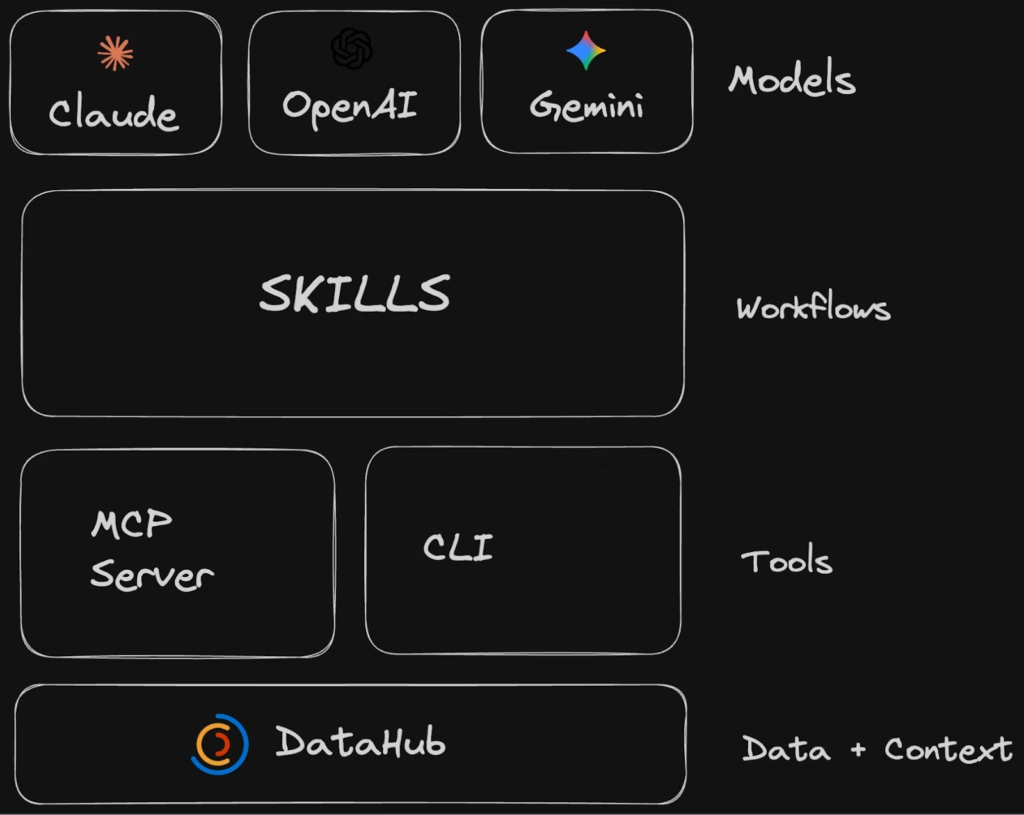
Skills vs MCP: From tools to workflows
A key distinction highlighted in the session:
- MCP / CLI tools → provide low-level capabilities (e.g., search, tagging, updates)
- Skills → define higher-level workflows using those tools
This allows teams to move from:
Isolated actions → to → Structured, repeatable workflows for agents
What this means for teams building with data and AI
Across the March Town Hall, a consistent pattern emerges:DataHub is no longer just a system for storing metadata. It is becoming the layer that makes that metadata usable across workflows, tools, and AI systems.
We saw this in practice:
- Teams using Ask DataHub to bring context into everyday questions
- Micro frontends enabling safe, modular extensions without forking
- Agents using the Agent Context Kit to generate more accurate and explainable results
- Skills turning low-level capabilities into reusable workflows
The shift is subtle, but important:
From managing metadata → to operationalizing context
For teams building modern data platforms, this changes how data is used—not just where it is stored.
Join the DataHub community shaping the future of data context
DataHub’s direction is shaped by the practitioners who use it every day—through real-world use cases, contributions, and feedback shared across the community.
If you’re exploring how to bring context into your data and AI workflows, here are a few ways to get started:
- Watch the full town hall recording to see the demos and walkthroughs in action
- Join the DataHub Slack community to connect with practitioners and contributors
- Explore DataHub Skills Registry and start building context-aware workflows
Whether you’re building data platforms, AI agents, or internal tools, DataHub provides the foundation for making data more understandable, trustworthy, and actionable.