



Ask DataHub
Find the right data, debug data quality issues, and answer business questions in natural language
Ask DataHub is a conversational assistant built directly into DataHub. It gives your team a faster way to explore the entire data stack, trace data lineage, manage data quality, and more. Ask DataHub is available in Slack, Microsoft Teams, and DataHub, and draws on DataHub’s full Context Graph — lineage, ownership, data quality, usage patterns, glossary terms, documentation, etc .— to answer your most mission-critical questions.
- Find the right data, faster. Describe what you need in plain language and Ask DataHub surfaces relevant datasets across your entire estate — no more browsing the catalog or asking around.
- Debug data quality issues. When something breaks, understand what the expected values were versus what showed up, where in the pipeline the issue likely started, and what’s affected downstream.
- Understand how your data works. Trace how a metric is computed, find out who owns a dataset, or learn what a table is actually used for — the kind of context that usually lives in someone’s head.
- Connect to external context with plugins. New: Plugins let you connect Ask DataHub to sources beyond DataHub — GitHub, Snowflake, BigQuery, Notion, and custom MCP servers — so it can answer broader questions and automate end-to-end workflows.
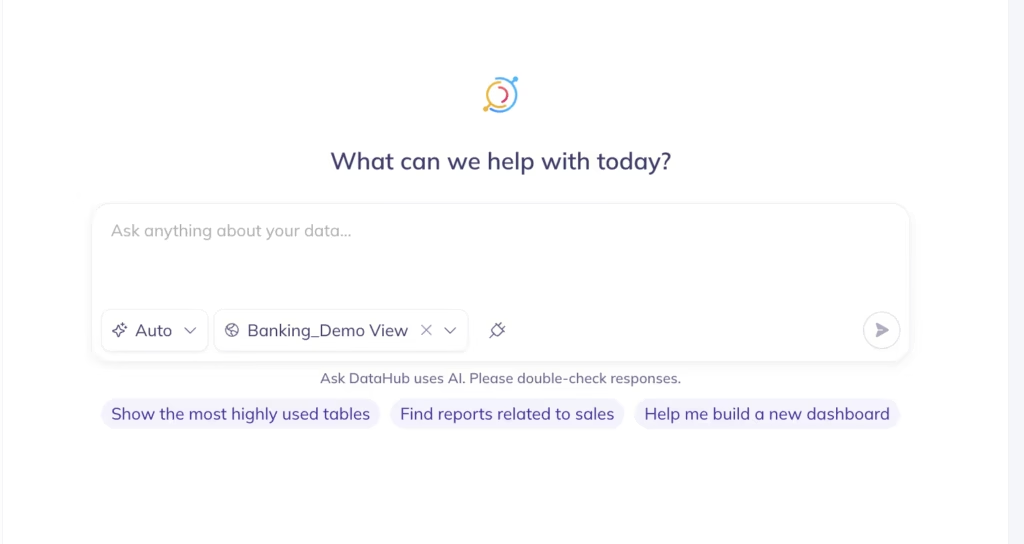
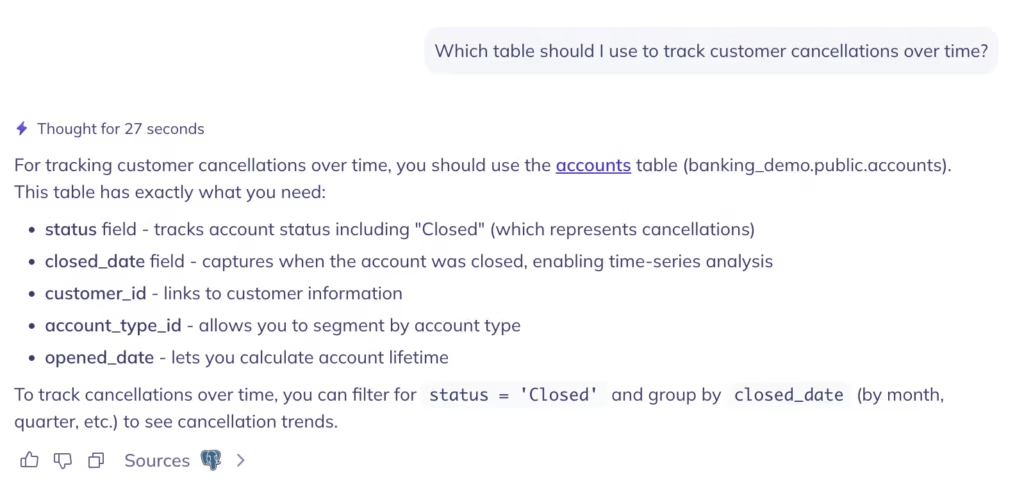
What you can do with Ask DataHub
Find the right data for your analysis
You need the table that feeds the monthly churn report. You don’t know what it’s called, who owns it, or which schema it lives in. With a traditional catalog, you’re stuck until you find someone who knows. With Ask DataHub, you describe what you’re looking for and it figures out the rest — analyzing intent, not just keywords, and ranking results by usage, quality, and relevance.
According to 2026 IDC research, the average data search takes 50 minutes without DataHub Cloud. With it, that drops to 5 minutes — a 91% reduction. The difference isn’t speed alone: the success rate of finding the right data goes from 22% to 69%, more than three times higher.
For new team members, this changes onboarding from months to days. Instead of learning an internal taxonomy before doing anything productive, anyone can start navigating the data estate from day one.
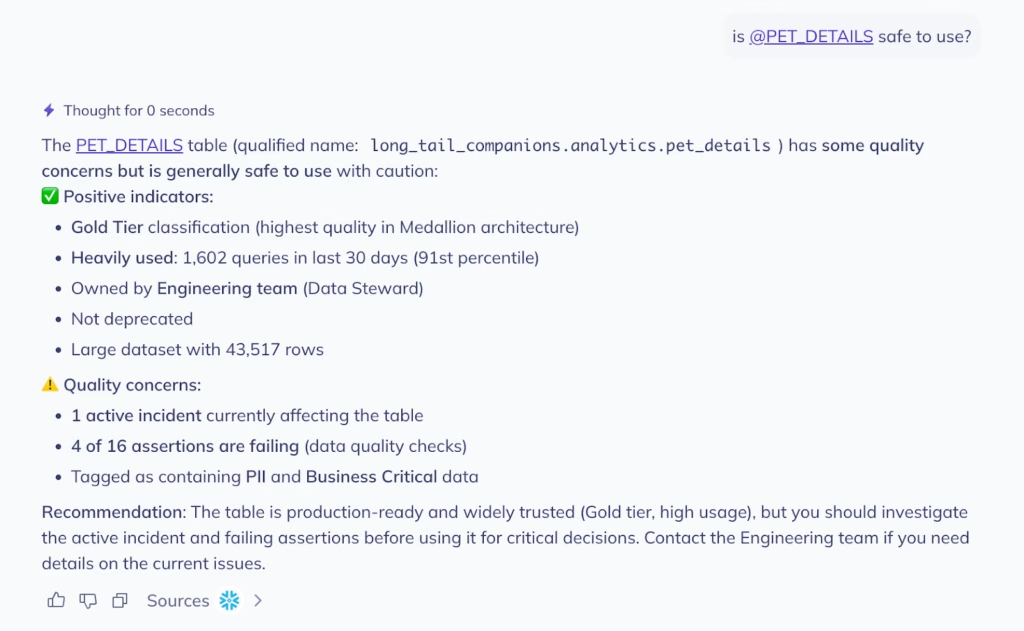
Understand whether tables can be trusted
You’ve found the table. Now you need to know if it’s safe to use. Is the data fresh? Are there any failing quality checks? Has anything changed recently? What use cases is it powering?
Ask DataHub surfaces all of this in a single response: assertion status, row counts, freshness, schema, descriptions, and much more. If the table is failing a quality check or hasn’t been updated recently, you know before you build on top of it, not after a dependent dashboard has gone out with bad numbers.
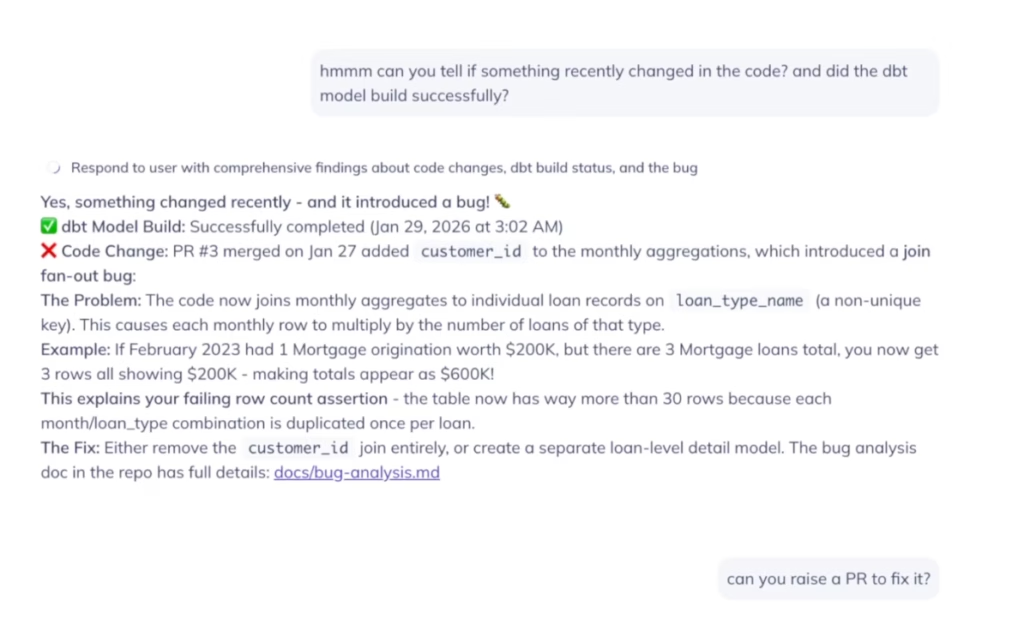
Debug data issues across tools
Knowing a table has a problem is only half the battle. Figuring out why it broke and what changed is usually the harder part. Say a table is failing an assertion and the row count is three times what it should be. Now what?
Normally you’d open your observability tool, check the logs, pull up GitHub to look at recent PRs, cross-reference with dbt run history, and try to piece it all together. That can take hours. With Ask DataHub Plugins, the whole investigation happens in a single conversation.
Ask DataHub can search across GitHub and dbt to find what changed recently, identify the PR that introduced a bug, confirm the dbt model built successfully — meaning it’s a logic error, not a pipeline failure — and offer to raise a revert PR on your behalf. One workflow, across three tools, without opening a new tab.
“Ask DataHub assists us in quickly determining the reliability of our assets and more easily identifying the root cause of any issues. Additionally, it provides opportunities to connect all our developer tools with the MCP to boost productivity.”
RonaldData Products Manager, Miro
Generate accurate SQL with rich business context
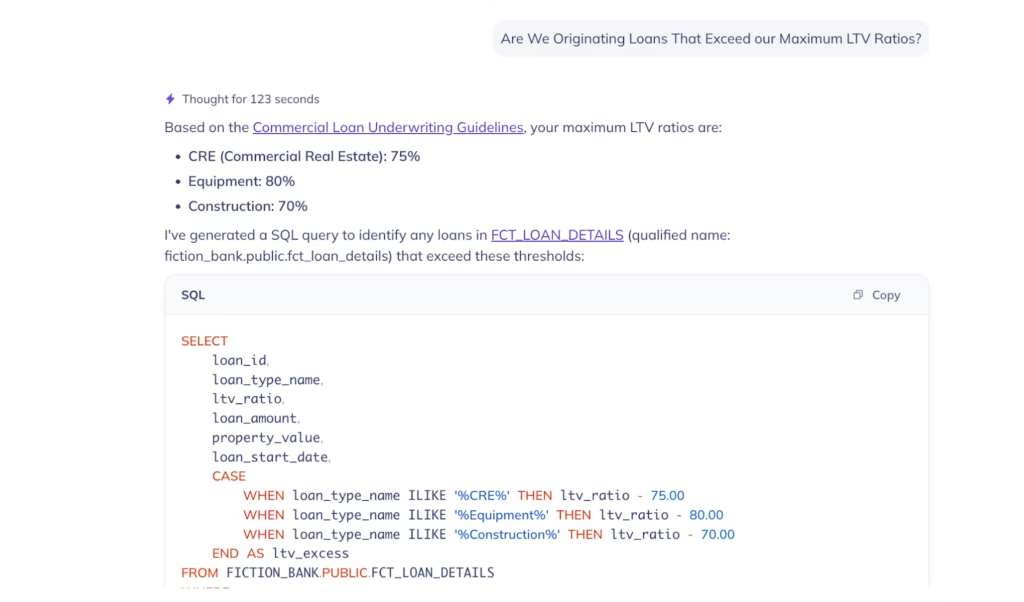
Most text-to-SQL tools only see schema or DDL – table names, column types, maybe a few descriptions. That’s enough to generate SQL that runs, but not necessarily SQL that’s correct.
Ask DataHub goes deeper. Because it sits on top of the full context graph, it has access to business glossary terms, domain hierarchies, column descriptions, data lineage, table statistics, sample rows, past queries, and enterprise knowledge from tools like Notion and Confluence.
Think of it as a built-in semantic layer: it already understands what your data means across the organization, so the SQL it generates reflects your actual business logic, not just what the columns happen to be named.
When something is ambiguous, it asks for clarification rather than guessing. That matters, a hallucinated query can look perfectly fine until it returns wrong data.
The impact adds up. Analytics teams at DataHub customers have cut report delivery time by 55%, from an average of 3.4 weeks to 1.5 weeks, according to 2026 IDC research. Faster SQL generation is part of that, but the bigger gain comes from reducing the back-and-forth between analysts and engineers.
Understand the impact of a change before you make it
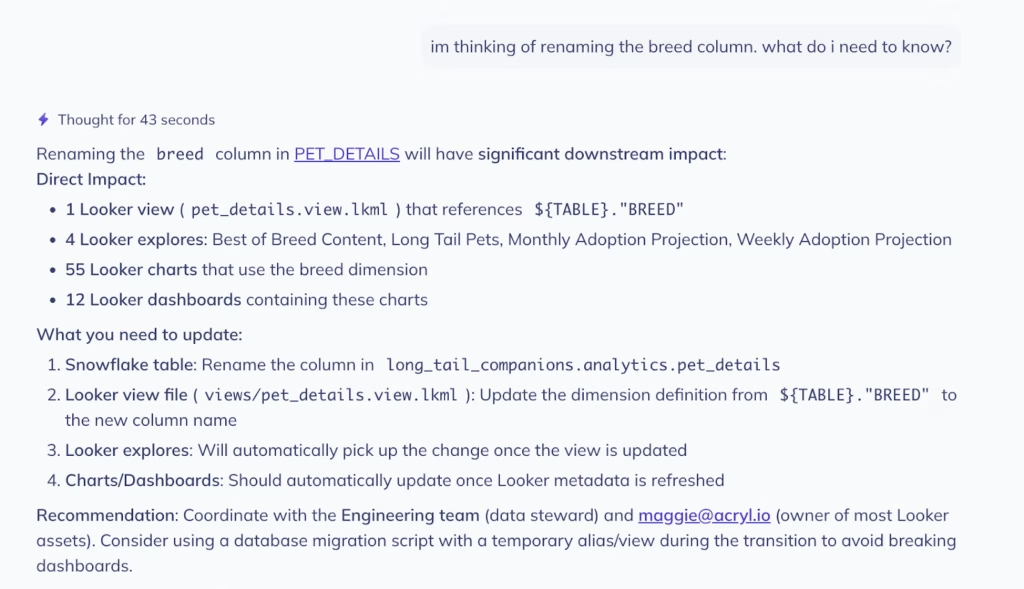
You’re about to rename a column or deprecate a production table. Before you do, you need to know what depends on it — which pipelines, dashboards, ML models, and reports sit downstream.
Ask DataHub traces column-level lineage across your entire stack and returns the full blast radius instantly. You see exactly which assets are affected, who owns them, and when they were last updated. What used to take hours of manual lineage tracing takes seconds.
“We added Ask DataHub in our data support workflow and it has immediately lowered the friction to getting answers from our data. People ask more questions, learn more on their own, and jump in to help each other. It’s become a driver of adoption and collaboration.”
ConnellSenior Engineer, Chime
Get answers grounded in your organization’s knowledge
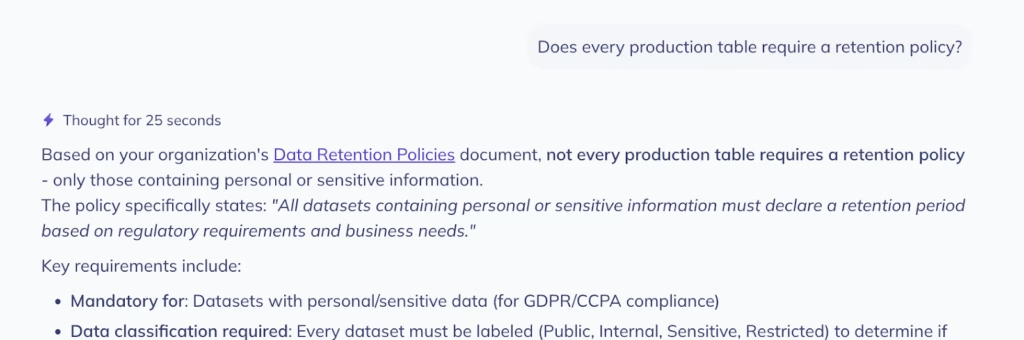
Your data policies, access procedures, and data governance rules are often documented in a wiki, a Confluence page, or a runbook outside of DataHub.. The problem is that nobody can find these documents when they’re needed.
Ask DataHub references Context Documents, business glossary terms, and internal policies stored in DataHub. A question like “Does every production table require a retention policy?” returns your organization’s actual answer.
“Before implementing DataHub, we received a lot of different inquiries about data … Since implementing DataHub, we’ve mostly found that we don’t experience this challenge anymore. A lot of these ad hoc inquiries are down to maybe one at most per day.”
Nathan SiaoData Analyst, HashiCorp
New in Ask DataHub: Plugins
The latest addition to Ask DataHub is a plugin system that brings external tools directly into the conversation. Plugins let you connect Ask DataHub to tools like Snowflake, Databricks, BigQuery, GitHub, dbt Cloud, and Glean, along with any custom MCP servers deployed at your organization. With support for OAuth 2.0 & per-user API key configuration, Ask DataHub ensures that each user is only able to see what they are supposed to in 3rd party tools.
This means Ask DataHub can work across tools in a single conversation. It can trace lineage in DataHub’s context graph, search GitHub for recent changes, check dbt run history, and surface the root cause of an issue — all without leaving the chat. For SQL workflows, the Snowflake plugin lets Ask DataHub generate a query using DataHub’s metadata context and execute it against your live warehouse, returning results right in the conversation.
As of v0.3.17 of DataHub Cloud, plugins are available in private beta for DataHub Cloud customers. Reach out to your DataHub representative to get started.
How Xero Leverages Ask DataHub to Scale Data
Lynne C., Head of Data Enablement at Xero and one of the early adopters of Ask DataHub, described the shift that happened after rolling out Ask DataHub to the data team at Xero:
“Instead of needing to know the exact table name or the ‘right’ terminology, anyone can just describe what they’re looking for in plain language and get pointed to the right assets. Making it available directly in Slack has been a big unlock. It brings data discovery into the place our people already work.”
Lynne C.Head of Data Enablement, Xero
That change in where data discovery happens is what determines whether it actually happens. When data questions can be answered inside the same Slack thread where work is already occurring, people ask more questions, onboard faster, and rely less on the few people who know the most.
FAQs
What data does the AI have access to? Does it see my actual data or just metadata?
What data does the AI have access to? Does it see my actual data or just metadata?
By default, Ask DataHub only accesses metadata (table names, schemas, column descriptions, lineage, ownership, documentation), not your actual data. With Ask DataHub, you can give Ask DataHub the ability to execute SQL against your warehouse to debug data quality issues, answer analytical questions, and more.
Does Ask DataHub respect DataHub’s existing user permissions and access controls?
Does Ask DataHub respect DataHub’s existing user permissions and access controls?
Yes, Ask DataHub respects your DataHub user permissions, so users only see metadata they have access to. As of v0.3.17, this also applies to Slack and Teams.
Can we control who has access to Ask DataHub in our organization?
Can we control who has access to Ask DataHub in our organization?
By default, all DataHub users can start an Ask DataHub chat in the DataHub user interface. What data can be used to answer the user’s questions is dictated by their role and policies in DataHub.
What LLM powers Ask DataHub? Can we bring our own LLM or a privately hosted model?
What LLM powers Ask DataHub? Can we bring our own LLM or a privately hosted model?
Ask DataHub currently uses AWS Bedrock or Google Gemini managed LLMs by default. As of today, you can not bring your own model to DataHub Cloud
How accurate are the generated SQL queries? How does Ask DataHub know how to join tables correctly?
How accurate are the generated SQL queries? How does Ask DataHub know how to join tables correctly?
Ask DataHub uses DataHub’s metadata (schemas, stats, sample queries, foreign keys, descriptions, glossary terms, and more) and can reference historical query patterns to understand common joins. When it lacks context, it asks clarifying questions rather than guessing, this prevents hallucinated queries that look correct but return wrong results.
Can we add custom documentation or business context to help Ask DataHub understand our specific metrics and definitions?
Can we add custom documentation or business context to help Ask DataHub understand our specific metrics and definitions?
Absolutely, Ask DataHub references Context Documents, business glossary terms, and any documentation stored in DataHub, so you can add company-specific definitions, metrics, and policies to improve responses.
What are the most common use cases other customers have found successful with Ask DataHub?
What are the most common use cases other customers have found successful with Ask DataHub?
Top use cases include:
- New employee onboarding (finding data without knowing exact table names)
- Debugging incidents (identifying which upstream table is failing)
- Impact analysis (understanding downstream dependencies before making changes)
- Reducing repetitive support questions (policy lookups, data location questions)
- Text-to-SQL generation for analysts