


Part 1: What Is an MCP Server? Model Context Protocol Explained
Imagine opening a brand new ChatGPT window and asking a simple question: “Why did revenue drop for our checkout funnel yesterday?”
The model might speculate about common causes. Or worse, pepper you with follow-up questions. But it can’t actually answer. It doesn’t know what your checkout funnel looks like. It can’t query your warehouse to see yesterday’s metrics. It can’t inspect production logs or debug the pipeline that generates those numbers.
AI models can reason, summarize, search the web, and generate code. But by default, they can’t understand your business. They don’t have access to the tools and systems your organization relies on to operate. And every new connection has historically required a custom integration—ones that break, drift, and multiply. The Model Context Protocol (MCP) was built to solve this problem.
Introduced by Anthropic in late 2024, MCP is an open standard that gives AI applications a universal way to connect to external data and tools. Instead of building custom integrations for every AI system, with MCP you can expose each data source in a format that any compatible agent can make use of.
The origins of MCP
Anthropic, the AI company behind Claude, introduced MCP in November 2024 as an open standard—and that choice was intentional. The integration problem MCP addresses isn’t tied to any single AI vendor. Organizations building AI agents all face the same fragmentation: different tools, data systems, authentication methods, and response formats, all stitched together with custom glue code.
Since its release, MCP has gained rapid adoption across the enterprise ecosystem. Major cloud providers (including AWS and Google Cloud) have built MCP servers for their services. AI development tools like Cursor, Windsurf, and Claude Desktop now ship with native MCP support. And a growing open source community maintains servers for everything from databases to CRM systems to code repositories.
The pace of adoption reflects a broader industry shift: As AI moves from single-turn chatbot interactions toward agentic workflows (where models reason across multiple steps, invoke tools, and take actions), the need for a standard connectivity layer becomes foundational. MCP is poised to emerge as that standard.
How MCP works: Components
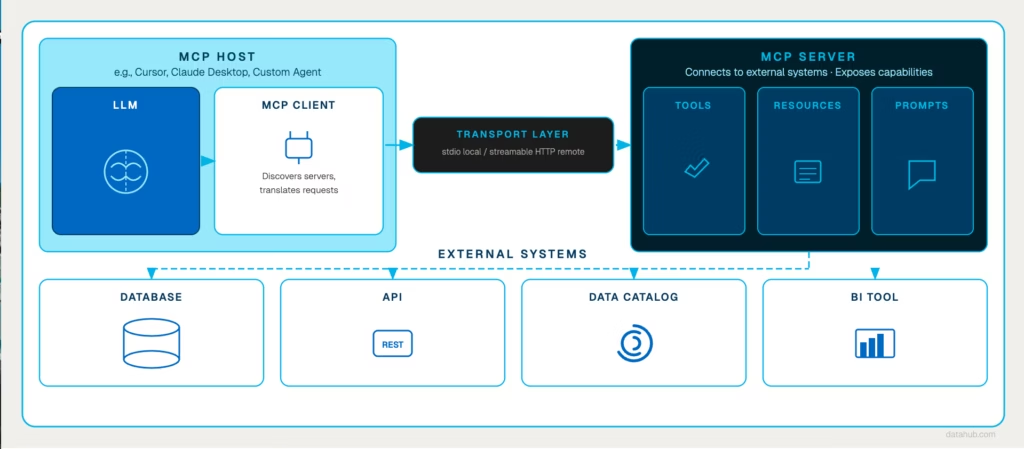
MCP follows a client-server architecture with four core components. Understanding how they interact is important (and interesting!)
1. MCP Host
The host is the AI-powered application your users interact with – an AI coding assistant like Cursor, a conversational interface like Claude Desktop, or a custom agent built for your organization. The host includes the LLM and orchestrates the overall interaction. When a user asks a question that requires external data, the host is where that request originates.
2. MCP Client
The MCP client runs inside the host application and manages communication with MCP servers. It sends requests compliant with the MCP protocol and returns responses in a format that the host’s LLM can use.
3. MCP Server
The server is where the real work happens. It connects to your external systems (databases, APIs, data platforms, BI tools) and exposes their capabilities through the standardized protocol. When the client sends a request, the server translates it into the appropriate action on the underlying system, retrieves the result, and sends it back.
MCP servers expose three types of capabilities
- Tools: Executable functions the AI can invoke to perform actions (run a query, fetch metadata, trigger a workflow).
- Resources: Data the AI can read, such as files, database records, logs, or documentation.
- Prompts: Reusable prompt templates that guide the model through common tasks or workflows.
4. MCP Transport
The transport layer defines how MCP clients and servers exchange messages. Local MCP servers typically communicate over standard input/output (stdio) for fast, direct interaction. Remote servers use streamable HTTP to enable real-time communication across the network.
Lifecycle of an MCP Request
Let’s consider an example to better understand how this works in practice.
A data engineer asks their AI assistant: “What’s the downstream impact of dropping the phone_number column from the users table?”
The AI model can reason about the question, but it doesn’t have access to the organization’s metadata. To answer it, the host application (e.g., Cursor) routes the request through its MCP client to a server connected to the company’s metadata platform.
The MCP server translates the request into the appropriate query against the metadata system and retrieves the column-level lineage. Maybe in this case, it finds 12 downstream dependencies, including three production dashboards.
That structured result is returned to the AI assistant, which synthesizes a clear, actionable response: Here are the 12 downstream dependencies, here are the three dashboard owners who should be notified, and here’s a suggested safe deprecation path.
The engineer gets a complete answer in seconds. No manual lineage checks. No jumping between a catalog, dashboards, and Slack threads. The MCP server handles the data retrieval, and the model handles the reasoning.
The MCP interaction pattern
In general, MCP workflows follow a simple loop:
- Discover available capabilities from MCP servers
- Query the relevant system through a tool or resource
- Synthesize the result into a useful answer
Because MCP standardizes this interaction, a single AI agent can connect to multiple MCP servers simultaneously—combining metadata from one system, query execution from another, and code analysis from a third within the same conversation.
The separation between the AI application and the data layer is what makes MCP viable at enterprise scale. Your security team doesn’t want AI tools directly accessing and changing data. With MCP, you control the surface area in one place—the MCP server—while empowering teams to adopt the AI tools that work best for them.
How MCP relates to RAG and APIs
Two questions come up almost every time we talk to data teams about MCP:
- How is this different from RAG?
- Why can’t we just use APIs?
The short answer to both: MCP doesn’t replace either—it changes how they work
MCP vs. RAG
Both Retrieval-Augmented Generation (RAG) and Model Context Protocol (MCP) exist for the same reason: Large language models don’t have access to your organization’s data by default.
RAG improves an AI’s responses by retrieving relevant documents and adding them to the model’s prompt. When a user asks a question, the system searches a knowledge base (often using embeddings), retrieves relevant text, and injects it into the prompt so the model can generate a grounded answer.
MCP solves a different problem: Instead of just retrieving documents, MCP allows AI agents to interact directly with live systems, querying databases, tracing lineage, triggering workflows. The interaction is dynamic: the agent sends a request, the server executes an action against a live system, and returns a structured result.
The two approaches are complementary, not competing.
In fact, MCP often is the retrieval layer—many RAG implementations use MCP servers to fetch knowledge from document stores, search systems, or vector databases through a standardized interface. The distinction isn’t “one or the other.” It’s that MCP gives agents access to both context and capabilities, and RAG is one pattern that can run on top of it.
Most teams aren’t choosing between MCP and RAG, they’re using both. RAG provides agents with access to outside context. MCP takes things a step further, giving agents access to both context and capabilities.
MCP vs. APIs
If you’re thinking “we already have APIs for this,” you’re not wrong, but you’re solving a different problem. Traditional APIs connect specific applications to specific services. Each integration is bespoke: You write code to authenticate, handle the request/response format, manage errors, and maintain the connection as the API evolves.
MCP changes the equation because AI agents need to interact with many systems dynamically. An agent might need to:
- Search a data catalog, then
- Execute some SQL queries
- Save in a dashboard for later
…all using a single common protocol.
| Traditional APIs | Custom integrations between specific applications and services |
| MCP | A universal protocol that allows any AI agent to connect to compatible systems |
What MCP alone doesn’t solve
MCP elegantly solves the connectivity problem. Organizations that move from prototype to production with MCP-connected agents quickly discover a second, harder problem: The agent can reach enterprise data, but it doesn’t understand the data.
A concrete example: When an AI agent connects to a database through an MCP server, it can see tables and execute queries. But it doesn’t automatically know:
- Which tables are trustworthy for analysis, and which are abandoned test schemas
- What quality issues exist in a given dataset
- Who owns a table and who to notify before making changes
- What business definitions and rules apply to a column called “revenue” (gross? net? ARR?)
This is the context gap. MCP provides the connection, but without enterprise context the agent has no understanding of the territory it’s operating within. It’s the difference between navigating the jungle with a map and compass, or wandering through it blind.
This is where the architecture beneath the MCP layer becomes critical.
DataHub addresses this challenge by serving as a unified metadata foundation that exposes comprehensive context through a single MCP server. Instead of connecting agents directly to raw data systems, DataHub gives them access to the full picture.
In Part 2, we explore how DataHub bridges the context gap—giving MCP-connected agents the lineage, ownership, quality signals, and business definitions they need to move from prototype to production. Read here→
FAQs
What are some examples of MCP servers?
What are some examples of MCP servers?
The MCP ecosystem has grown rapidly since the protocol’s introduction. The Model Context Protocol servers repository on GitHub maintains a directory of reference implementations and community-built servers covering databases, developer tools, web services, and more.
Many major cloud providers have provided their own, including:
- Snowflake MCP Server
- Databricks MCP Server
- BigQuery MCP Server
- GitHub MCP Server
- dbt Cloud MCP Server
- Glean MCP Server
For data infrastructure specifically, DataHub provides an MCP server focused on metadata context—lineage, ownership, quality, and documentation—rather than raw data access, giving AI agents the understanding they need to work with your data responsibly.
Is MCP open source?
Is MCP open source?
Yes. Anthropic released MCP as an open standard with an open source specification and SDKs available in Python and TypeScript. The protocol specification, reference implementations, and developer tools are all publicly available on GitHub.
This openness is a core design principle: MCP aims to prevent vendor lock-in and enable any AI application to connect to any MCP server, regardless of who built either side. DataHub’s MCP server is similarly available as open source through the mcp-server-datahub package.
How secure is MCP?
How secure is MCP?
MCP itself is a protocol specification so security depends on how individual servers implement it. Key security considerations include:
- Authentication and authorization (who can connect and what they can access)
- Data privacy (controlling what information gets exposed to AI agents)
- Transport security (encryption in transit via HTTPS for remote servers)
- Audit logging (tracking what agents query and when)
Enterprise MCP deployments typically layer these controls on top of the protocol. DataHub’s MCP server, for example, integrates with existing role-based access controls and identity providers (Okta, Azure AD, AWS IAM) so agents can only access metadata their users are authorized to see, with every query logged for compliance review.
What use cases does MCP support beyond data?
What use cases does MCP support beyond data?
While this post focuses on data infrastructure, MCP is a general-purpose protocol. Servers exist for:
- Code repositories (allowing agents to search and understand codebases)
- Development tools (running tests, managing builds and deployments)
- Business applications (CRM systems, project management tools, communication platforms)
- Web services (search engines, monitoring dashboards)
- File systems (local and cloud storage)
The protocol is tool-agnostic—any system that can expose capabilities through an API can be wrapped in an MCP server, making it accessible to any compatible AI agent.