



DataHub Cloud Updates November, 2025
We’re excited to announce the release of DataHub Cloud v0.3.15. This update lets you embed documentation directly into data assets, teaches Ask DataHub to think like your organization, and gives you the management tools to scale data quality monitoring across your entire stack.
Upload Attachments to Asset Documentation
The problem it solves
Data teams waste hours hunting for context. Your architecture diagram is in Slack, your business requirements are in Confluence, and your data dictionary is buried in a shared drive. By the time you find everything, you’ve lost half your day. Now, all documentation lives directly with your data assets in DataHub.
What it enables
- Find data AND its context in one search. No more hunting across 5 different tools for that ERD or business requirements doc
- Onboard new team members in hours, not weeks. They see visual guides, compliance docs, and usage examples right where they discover the data
- Prevent costly mistakes. Critical warnings and usage guidelines are impossible to miss when embedded directly in the dataset
What’s new
Drag and drop any file (PDFs, CSVs, images, diagrams) directly into asset documentation. Images render inline automatically, creating rich visual context right where teams need it.
Why it matters
Before this release, teams had to leave the catalog to find critical context, breaking their workflow and risking missing important documentation. Now DataHub becomes your single source of truth for both data discovery AND understanding.
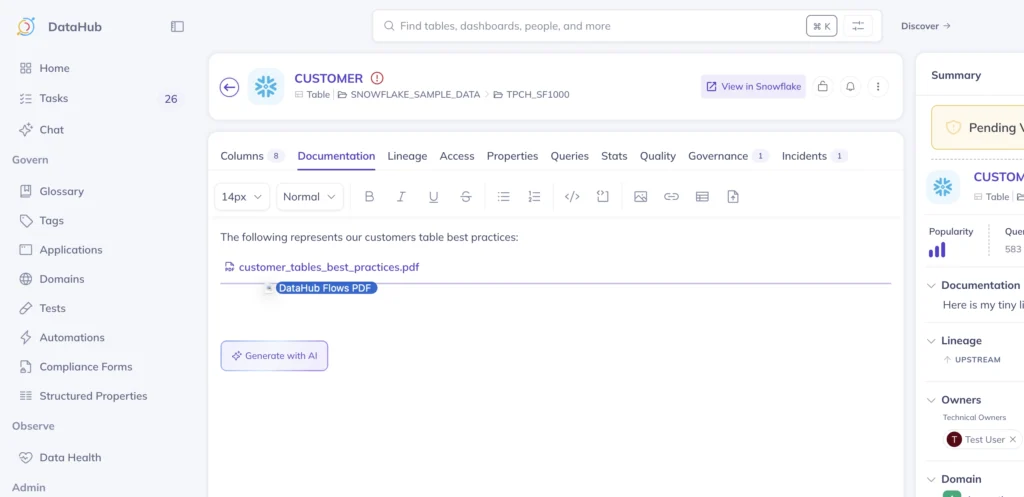
Learn more about uploading attachments to Asset Documentation in our docs.
Custom Prompts for Ask DataHub
The problem it solves
Generic AI search treats all data equally. Production datasets appear alongside dev tables, deprecated assets mix with certified ones, and your AI agent doesn’t know that your team calls customers “members” or that only gold-tier datasets should be trusted. Now you can teach Ask DataHub to think like your organization.
What it enables
- AI that speaks your language. It knows “members” means customers, prioritizes your gold-tier datasets, and understands your specific business terms
- Trust search results immediately. Production data surfaces first, staging tables are hidden, and certified datasets are highlighted automatically
- Zero training needed for new users. Ask DataHub already knows your data standards, naming conventions, and what’s important. No need to explain your ecosystem to every new hire
What’s new
Configure your Ask DataHub (DataHub AI assistant) with custom instructions that reflect your organization’s priorities. Set rules like “always prioritize certified datasets,” “ignore anything with ‘test’ in the name,” or “treat ‘member’ and ‘customer’ as synonyms.” The AI follows these rules automatically for every search.
Why it matters
Out-of-the-box AI doesn’t understand that your finance team’s “GL” means General Ledger or that only datasets tagged “production” should be used for reporting. Without context, AI search becomes another tool people don’t trust. Custom prompts transform Ask DataHub from a generic search into your organization’s data expert—one that knows your standards, terminology, and what really matters to your teams.
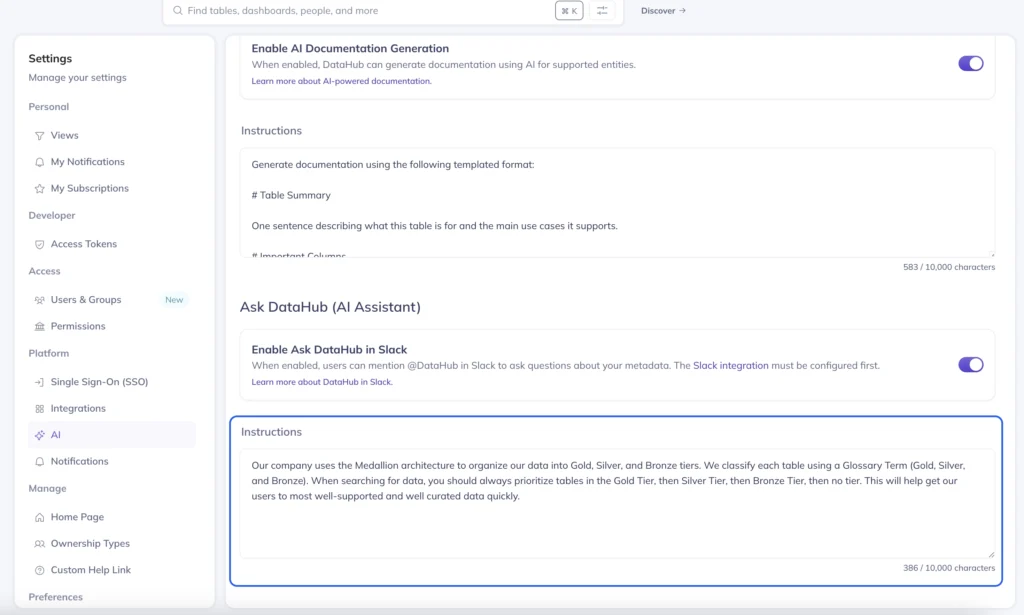
Learn more about Custom Prompts for Ask DataHub in our docs.
Custom Prompts for AI Docs Generation
The problem it solves
DataHub released AI-generated documentation this summer to help teams document datasets in seconds instead of hours. But every organization has different documentation standards. Some need business context first, others require technical specs, and many need specific warnings about PII or data quality. Now you can teach AI your documentation standards so every generated description matches exactly what your teams need.
What it enables
- Your documentation standards, enforced automatically. Every table description includes your required sections, such as business purpose, data sources, important columns, and compliance notes
- Scale documentation without compromising quality. Generate thousands of descriptions that follow your exact template,from refresh schedules to PII warnings to business glossary terms
- Documentation that’s immediately useful. No more editing AI output to add missing context. It generates complete, actionable documentation on the first try
What’s new
Create custom templates that tell DataHub AI exactly how to document your data. Use the Instructions field to define required sections (like “# Table Summary” and “# Important Columns”), specify the tone and detail level, and ensure every generated description includes the business context and technical details your organization requires.
Why it matters
AI-powered documentation was already saving teams hours per dataset. But organizations told us they still had to manually add their specific requirements, like data lineage notes, compliance warnings, or business unit ownership. Custom prompts eliminate this manual step. Now AI doesn’t just generate documentation faster, it generates the exact documentation your organization needs, making the feature even more powerful for enterprise teams.
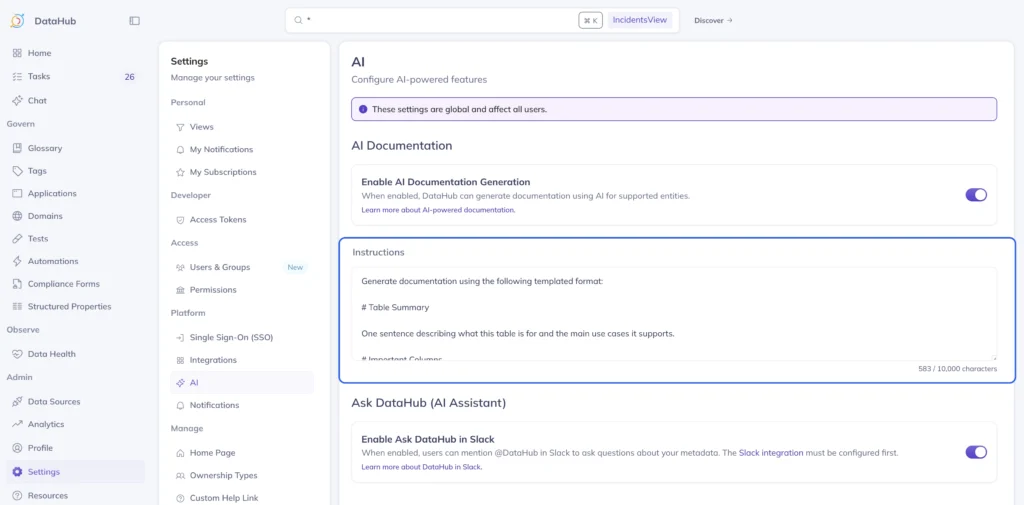
Learn more about Custom Prompts for AI Docs Generation in our docs.
SQL Assertion Anomaly Detection
The problem it solves
Your critical business metrics aren’t simple column checks. They’re complex calculations like conversion rates, profit margins, or inventory turnover ratios. When these metrics drift, you don’t find out until the CFO asks why revenue forecasts are off or why inventory costs spiked. Standard data quality tools can’t monitor these custom calculations. Now you can write any SQL query and let ML detect when the results look wrong.
What it enables
- Monitor the metrics that actually matter. Track conversion rates, customer LTV/CAC ratios, or margin calculations—any KPI you can express in SQL
- Catch problems your rules would miss. ML learns your normal patterns and alerts on subtle anomalies, like when morning traffic is 5% lower than usual for a Tuesday
- Turn institutional knowledge into automated monitoring. That senior analyst who always knows when data “looks off”? Now their expertise becomes SQL monitors that run 24/7
What’s new
Write any SQL query to define your custom metric.Calculate ratios between columns, compare time periods, aggregate across dimensions. DataHub’s ML automatically learns the normal pattern for your metric and alerts when it detects anomalies, no thresholds required.
Why it matters
Before this release, you could monitor if a column was null or if row counts dropped. But you couldn’t monitor if your cost-per-acquisition suddenly increased 20% or if the ratio of mobile to desktop users shifted unexpectedly. The metrics that drive business decisions require complex SQL calculations. Now those calculations become intelligent monitors that catch issues before they hit your dashboards, reports, or executive presentations.
SQL Assertion Anomaly Detection in DataHub flags conversion rate anomaly.
Learn more about SQL Assertion Anomaly Detection in our docs.
Bulk Subscriptions Management
The problem it solves
Data quality monitoring with DataHub Cloud has been transformative. Teams catch issues before they reach production and trust their data more than ever. But success creates a new challenge: as organizations scale monitoring across hundreds of datasets, managing who gets notified about what becomes overwhelming. Enterprise teams need to audit alert coverage, remove outdated subscriptions, and ensure the right people get the right alerts. Until now, this meant clicking through subscriptions one by one. Now, you can manage hundreds of subscriptions from a single dashboard.
What it enables
- Scale monitoring without losing control. Expand data quality coverage to thousands of datasets while keeping alerts organized and targeted
- Clean up subscriptions in minutes, not days. Select and modify multiple subscriptions at once—perfect for team reorgs, project completions, or quarterly cleanup
- Ensure critical alerts reach the right people. See all subscriptions in one view to spot gaps in coverage or redundant notifications instantly
What’s new
A centralized subscription management dashboard shows all your active subscriptions in one table. Filter by asset, alert type, or recipient. Select multiple subscriptions to edit or delete them simultaneously. See exactly what triggers each alert and where notifications are sent.
Why it matters
Data quality monitoring works great until you have 500 subscriptions across 50 team members. People change teams, projects end, datasets get deprecated—but subscriptions remain. Without bulk management, cleanup is so tedious that most teams just live with the noise. Now, you can audit and fix hundreds of subscriptions in the time it used to take to fix ten.
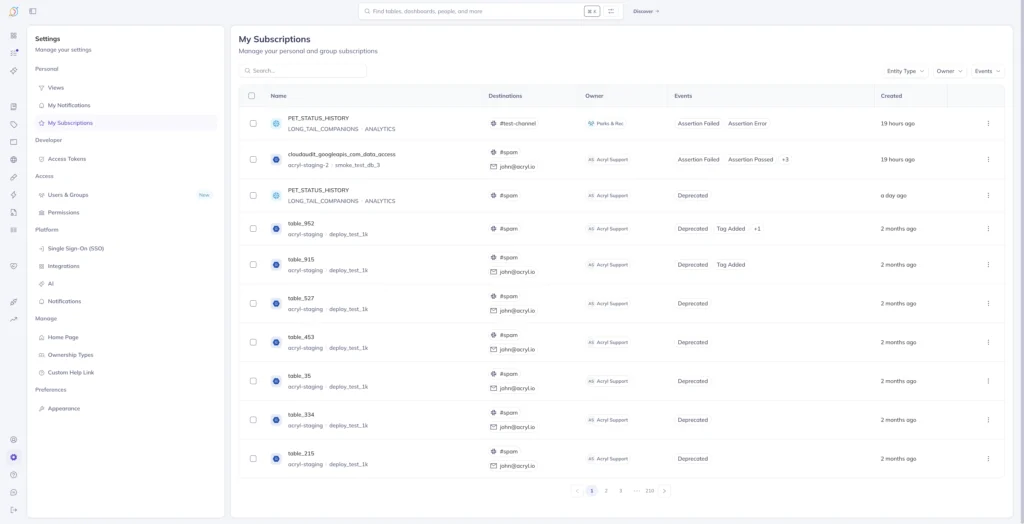
Learn more about Subscriptions Management in our docs.
Simplified Structured Properties Display
The problem it solves
Structured Properties let you extend DataHub with custom metadata fields (e.g. compliance status, data classification, business metrics) tailored to your organization’s needs. But as teams added more properties to capture everything from SLAs to cost centers, every dataset displayed all fields, even empty ones. Now empty properties automatically hide, showing only what’s relevant for each dataset.
What it enables
- Find critical metadata instantly. No more scrolling past empty compliance fields to find the business owner, or past blank quality scores to see refresh schedules
- Scale metadata without cluttering the UI. Add 50 custom properties for different use cases without overwhelming users who only need to see the 3 that apply to their dataset
- Different views for different data types. Marketing datasets show campaign fields, financial data shows compliance properties, ML features show model metadata—all using the same catalog
What’s new
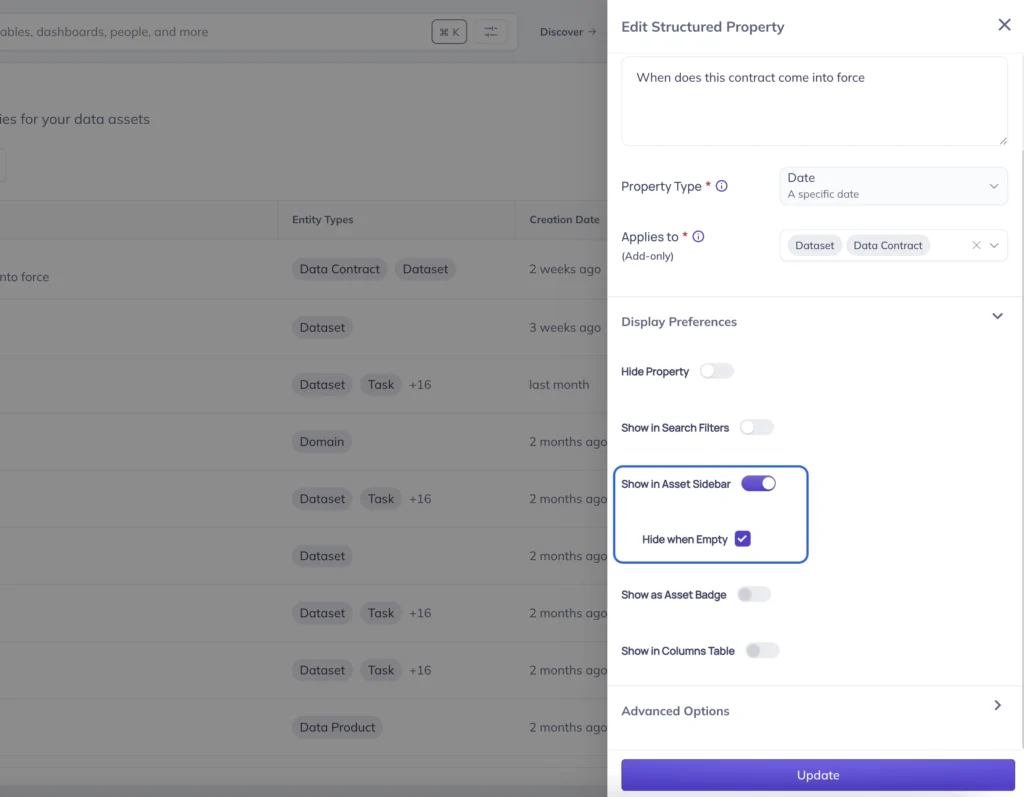
Set any structured property to “hide when empty” at the definition level. Properties only appear on assets where they have values, creating clean, focused views automatically tailored to each dataset.
Why it matters
Enterprise organizations need different metadata for different assets—compliance fields for regulated data, performance metrics for ML models, cost tracking for cloud resources. Without this feature, you had to limit custom properties to keep the interface usable. Now, you can create comprehensive metadata for every use case while users only see what’s relevant.
Learn more about Structured Properties in our docs.
Comprehensive Ingestion Logs
The problem it solves
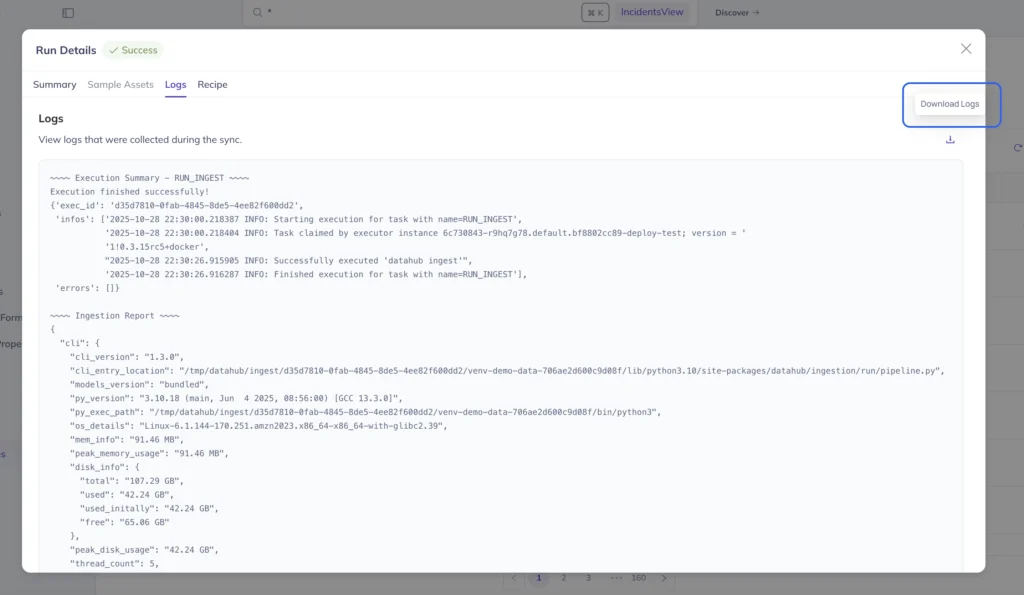
When Snowflake ingestion fails at 3 AM and dashboards are empty, debugging requires understanding the full set of ingestion run logs. Now DataHub Admins can download complete ingestion logs directly from the DataHub UI—no terminal access required.
What it enables
- Debug ingestion failures in minutes, not hours. Download full execution logs with one click to see exactly where ingestion failed and why
- Enable self-service troubleshooting. Data engineers, analysts, and ops teams can all investigate issues without waiting for someone with server access
- Share context instantly with support. Send complete logs to DataHub support or teammates without copying terminal output or taking screenshots
What’s new
Every ingestion run now has a “Download Logs” button in the UI. Get complete execution logs for any source—Snowflake, Databricks, Tableau—including detailed error messages, row counts, and timing information. Works for all deployments including DataHub Remote Executor.
Why it matters
Ingestion failures break everything downstream, but debugging required specialized server access that created bottlenecks. Now anyone can investigate failures and share logs with full context. This cuts incident resolution from hours to minutes and removes dependencies on specific team members with terminal access.