



How Foursquare Uses DataHub for Geospatial Dataset Discovery
Geospatial data is incredibly valuable, but working with it can be complex.
Datasets come from different sources, projections do not always align, tools vary widely, and meaningful analysis often requires deep domain expertise.
In our February 2026 DataHub Town Hall, Shishir Ambastha, Tech Lead for the Geospatial Intelligence Platform team at Foursquare, explained how his team addresses these challenges to make geospatial analysis more accessible.
During the session, Shishir walked through three common sources of friction in geospatial workflows: data fragmentation, tooling complexity, and knowledge gaps.
Within Foursquare’s Geospatial Intelligence Platform, DataHub acts as the discovery engine. It provides the metadata layer that enables users to find, access, and explore indexed datasets through the Spatial H3 Hub catalog.
Three key challenges in geospatial workflows
Working with geospatial data introduces challenges that differ from typical data workflows. These workflows tend to encounter friction across three core areas:
1. Data fragmentation
Geospatial datasets often originate from different sources and formats, making them difficult to combine for analysis.
2. Tooling complexity
Many traditional GIS tools are designed for specialized workflows and require significant expertise before users can perform analysis.
3. Domain knowledge gaps
Even with the right data and tools, translating a business question into geospatial analysis often requires domain-specific expertise.
To address these challenges, Foursquare built a spatial ecosystem designed to simplify how datasets are indexed, discovered, and analyzed. A key component of this ecosystem is the Spatial H3 Hub, which organizes geospatial datasets using H3 indexing.
Solving data fragmentation with the Spatial H3 Hub
Data fragmentation creates a major barrier to geospatial analysis. Datasets describing the same region may use different spatial projections, coordinate systems, or levels of spatial resolution.
Because of these differences, combining datasets often requires complex geospatial transformations before analysis begins. Even relatively simple operations—such as joining two datasets—can become difficult when their spatial representations are incompatible.
A universal grid with H3 indexing
Foursquare addresses this challenge with the Spatial H3 Hub, which organizes datasets using a universal spatial grid based on H3 indexing.
H3 divides the Earth’s surface into hierarchical hexagonal cells. By indexing datasets into this shared grid, spatial operations can be simplified into standard database joins instead of complex geospatial calculations.
In practice, this means unrelated datasets can be aligned and analyzed using the same spatial index.
Building an analysis-ready geospatial catalog
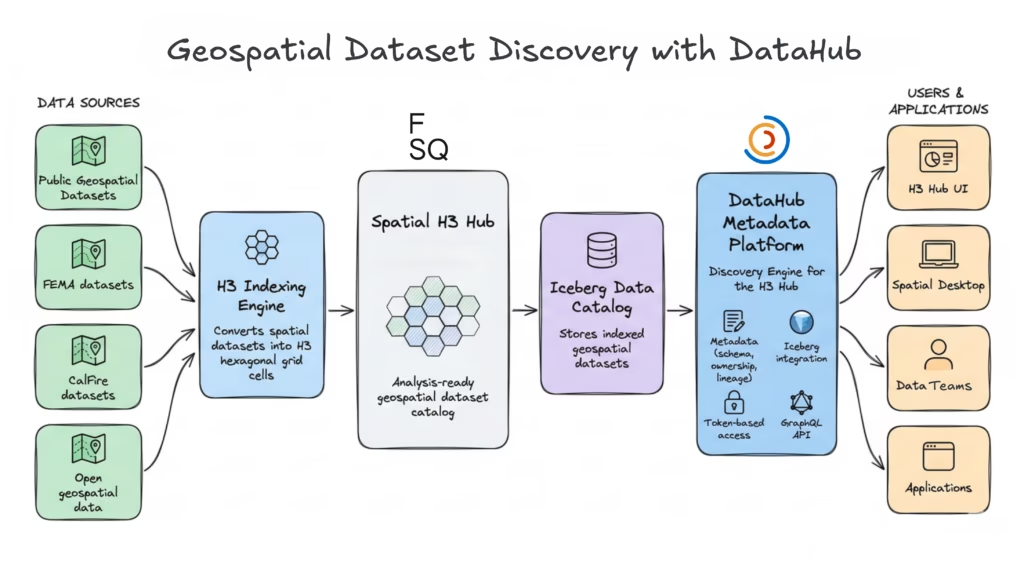
The H3 Hub consists of two key components:
- H3 indexing engine: augments datasets with H3 indices
- Analysis-ready dataset catalog: stores indexed data for discovery and analysis
Using this architecture, Foursquare has indexed over 50 public datasets, making them available for spatial analysis through the H3 Hub.
DataHub as the discovery engine
To make these datasets discoverable, Foursquare uses DataHub as the discovery engine behind the H3 Hub.
DataHub provides the metadata layer that powers dataset discovery and access across the platform. It serves several roles within the H3 Hub architecture:
- Unified metadata repository: maintaining dataset ownership, schema, and lineage information for indexed datasets using DataHub’s metadata model
- Integration with Apache Iceberg catalogs: allowing DataHub to synchronize directly with table metadata through its Iceberg catalog integration
- Token-based access control: securing programmatic dataset access using DataHub personal access tokens
- GraphQL-powered discovery: enabling users to search and filter datasets across all metadata attributes using the DataHub GraphQL API
This architecture allows users to discover indexed datasets through the H3 Hub and access them programmatically from the catalog.
While the H3 Hub simplifies how datasets are aligned and discovered, another challenge remains: making geospatial analysis accessible without requiring deep expertise in traditional GIS tools.
Simplifying geospatial tooling with Spatial Desktop
Even when geospatial datasets are properly indexed and discoverable, analyzing them can still be difficult. Traditional GIS tools often have steep learning curves and are designed for specialized workflows.
For many analysts and data practitioners, these tools introduce unnecessary complexity. Performing spatial analysis often requires domain expertise, specialized software, or complex configuration before meaningful insights emerge.
As a result, geospatial analysis often remains limited to expert users rather than being accessible to the broader data community.
A SQL-first approach to geospatial analysis
To address this challenge, Foursquare built Spatial Desktop, a geospatial computing application designed to make spatial analysis more accessible to data practitioners.
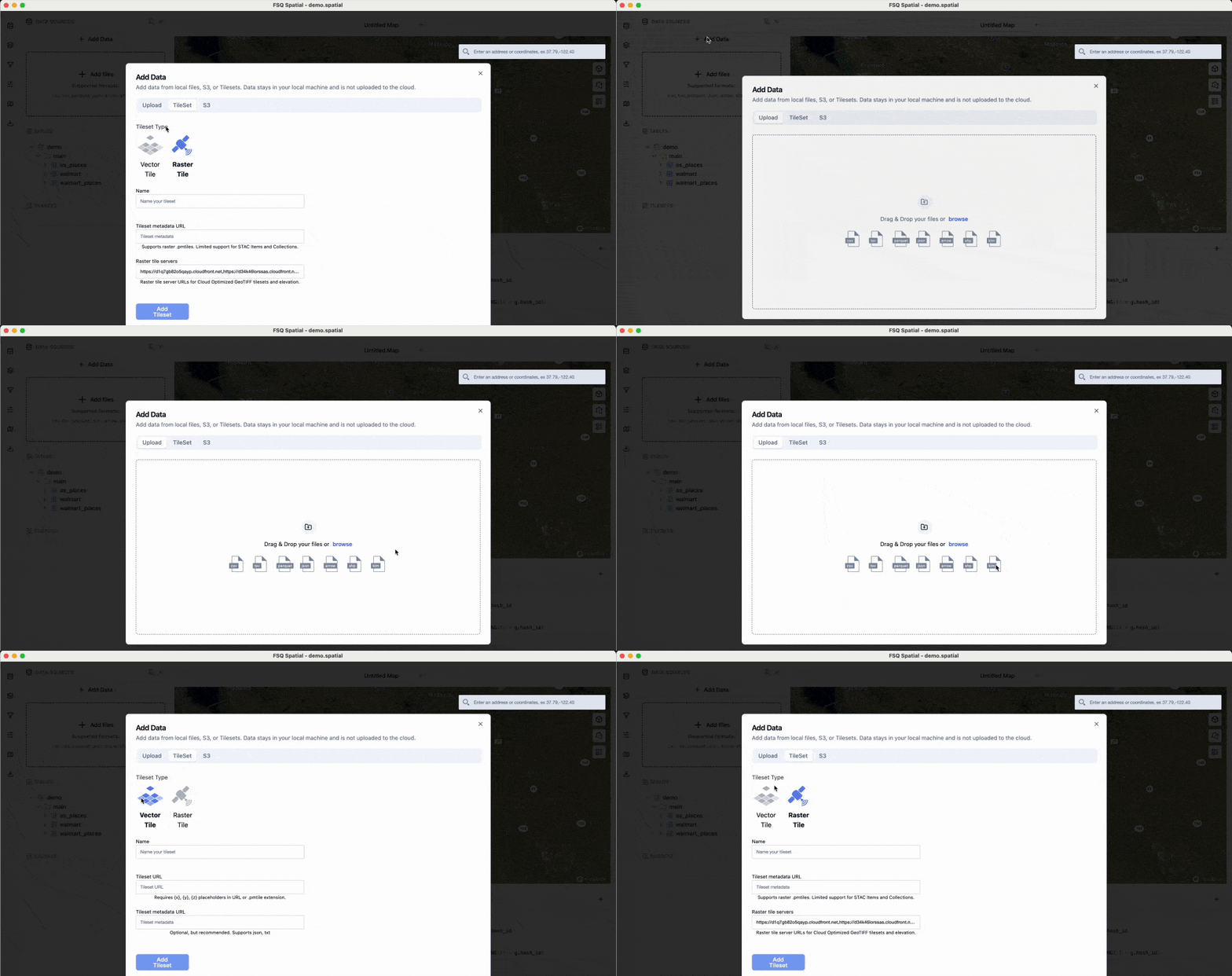
Spatial Desktop allows users to drag and drop datasets into the environment and begin analyzing them immediately. Instead of requiring specialized GIS workflows, the platform enables geospatial analysis using familiar SQL-based queries.
With this approach, analysts can query datasets, join spatial tables, and explore results without needing deep expertise in traditional GIS tooling.
Interactive visualization and high-performance processing
Spatial Desktop combines SQL querying with interactive visualization, allowing users to explore spatial datasets directly within the application.
Visualizations are powered by Kepler.gl, an open-source library for rendering large geospatial datasets interactively.
Under the hood, the platform uses DuckDB as its processing engine, enabling high-performance analytical queries and fast local processing.
Together, these components allow analysts to move quickly from dataset discovery to interactive geospatial analysis.
Bridging the geospatial knowledge gap with Spatial Agent
Translating real-world questions into geospatial workflows can still be difficult, even when datasets are discoverable and tools are available.
Spatial analysis often requires specialized domain expertise. Analysts must understand spatial indexing, coordinate systems, and the operations needed to generate meaningful insights.
As a result, answering even straightforward business questions can require significant geospatial expertise.
Natural language to geospatial workflows
To address this challenge, Foursquare built Spatial Agent, an AI-powered assistant designed to translate natural language questions into geospatial analysis workflows.
Instead of manually constructing queries and workflows, users can ask questions in natural language. The agent interprets the request, generates the required spatial queries, and orchestrates the operations needed to produce results.
In practice, this means users can move from a high-level question—such as identifying regions with high wildfire risk—to the spatial analysis needed to generate insights.
Connecting the FSQ Spatial Ecosystem
The Spatial Agent operates within the Spatial Desktop environment and can access datasets indexed in the Spatial H3 Hub. They are organized and made discoverable through the H3 Hub catalog, where DataHub provides the underlying metadata and discovery layer.
This allows the agent to orchestrate workflows across the spatial ecosystem:
- Work with datasets indexed in the H3 Hub
- Query and analyze them within Spatial Desktop
- Generate maps, charts, and spatial insights automatically
By combining natural language interaction with programmatic spatial analysis, the Spatial Agent helps reduce the expertise barrier that often limits geospatial analytics.
Demo: Bringing the FSQ Spatial Ecosystem together
The spatial ecosystem brings together dataset discovery, geospatial analysis, and natural language orchestration into a single workflow.
A typical interaction begins with a natural language question within FSQ Spatial Desktop. For example, identifying populated areas in California with the highest insurance risk.
Foursquare’s Spatial Agent interprets the request, identifies relevant datasets available through the Spatial H3 Hub, and orchestrates the analysis required to produce results.
As the process runs, the system retrieves spatial boundaries, converts them into H3 cells, combines multiple datasets, and generates maps, charts, and a final summary highlighting geographic risk patterns.
This workflow illustrates how the spatial ecosystem comes together:
- DataHub enables dataset discovery through the H3 Hub catalog
- H3 indexing standardizes geospatial datasets for analysis
- FSQ Spatial Desktop provides the analytical environment
- FSQ Spatial Agent translates natural language questions into geospatial workflows
Together, this ecosystem lowers the barrier to geospatial analysis. It allows teams to explore and analyze location data without requiring deep expertise in GIS tools, spatial indexing, or complex geospatial queries.
Watch the full session
The February DataHub Town Hall featured the launch of DataHub Skills and an AI-assisted connector demo, along with product roadmap updates and a geospatial showcase from Foursquare. Watch the full recording on YouTube.
To continue exploring DataHub:

Explore DataHub Skills
Explore DataHub Skills on Skills.sh to build custom integrations for your data stack.